When a marketing team brings Gemini into its daily work, it sooner or later runs into the same need: instead of checking ad accounts, the CRM, and analytics data in separate tabs, being able to ask Gemini about all of them directly. MCP (Model Context Protocol) is the standard connection format that lets an AI assistant talk to an external system this way, and it has spread quickly in marketing over the past year.
But not every MCP server does the same thing. Some only read data and turn it into reports, some go a step further and surface a finding the vendor has calculated itself (such as waste detection, a forecast, or an anomaly), and some can actually make changes in your account. On top of that, "Gemini" is not a single product: the chat app you use with a personal account, your company's Workspace subscription, and an enterprise Gemini Enterprise setup behave quite differently when it comes to adding an MCP server.
This guide covers how MCP actually works across Gemini's different surfaces, the criteria you should use to compare the MCP servers that stand out for marketing, and where Orphex fits into the picture. If you want a broader look at the general MCP concept and a platform-independent comparison, see our Best MCP Servers for Marketing Teams (2026) guide.
Which MCP stands out for which use case with Gemini?
The MCP servers that stand out for marketing teams in the Gemini context differ largely by the job they solve. Orphex stands out for multi-channel performance marketing data; Semrush and Ahrefs for SEO and search visibility; HubSpot for CRM and sales data; and Klaviyo for email/SMS lifecycle flows. On the ad platform side, Google Ads covers its own account reporting, while Meta Ads covers both reporting and campaign/catalog operations. Shopify brings e-commerce data, Zapier brings actions across different apps, and Slack brings team context into Gemini.
The profiles below summarize each MCP's core use case, its read/write status, and the key limits that matter at the decision stage. For Gemini-specific connection details, see the comparison table that follows shortly.
Orphex MCP: multi-channel performance marketing data and controlled action.
Combines data from different ad platforms, analytics sources, and e-commerce systems through a single MCP.
In addition to raw data, it provides ready-made findings the platform calculates itself (such as budget waste and creative fatigue).
It has conditional write access protected by an approval mechanism; the scope varies by plan, workspace, and platform.
For Gemini Enterprise, there is a technical connection path on the Google side over Streamable HTTP; see the Orphex section below for details.
Semrush MCP: structured read access to SEO and competitive data.
Queries keyword, backlink, and traffic data for reporting purposes; read-only.
Official sources are inconsistent on Gemini: the current technical documentation says Gemini CLI support has ended, while the general marketing page still lists the name "Gemini" generically.
Ahrefs MCP: broad SEO reporting.
Summarizes backlink profile and organic traffic analysis in a single query and supports project-based SEO tracking.
Named support for Gemini was not verified in the official sources reviewed; only Claude Desktop and Cursor are named.
HubSpot MCP: read + write access to CRM data, read access to marketing content.
Pulls lead and deal data straight from the CRM and supports actions such as creating and updating CRM records; marketing content such as campaigns, landing pages, and blog posts is read-only.
Gemini appears only narrowly, as "Claude, ChatGPT, Gemini" in a single tool description; there is no separate Gemini setup page.
Klaviyo MCP: read + operational write access to email and SMS lifecycle data.
Queries segment and flow performance and can make operational changes to campaigns and flows.
The Gemini name does not appear in any of the four separate official sources.
Google Ads MCP: read-only access to account structure and performance data.
Explores campaign, ad group, and keyword structure and reads Google's own recommendations.
It runs local/self-hosted by default; the officially named support now points to Antigravity rather than Gemini CLI.
Some diagnostic recommendations live in a separate Agent Skill layer, not in the MCP itself.
Meta Ads MCP: reporting and campaign/catalog operations.
Reads ad set and creative performance; runs campaign, ad operations, and catalog updates through the MCP.
Gemini is not named in the official sources; there is only the generic statement that it "works with any MCP-compatible agent."
Shopify MCP: store data split into developer and commerce surfaces.
Not a single MCP; there is a Dev MCP and separate commerce surfaces such as Storefront, Checkout, Cart, Order, and Customer Account.
Only the Dev MCP adds Gemini CLI to its official list; the commerce surfaces carry no such naming.
Zapier MCP: multi-app action layer.
Does not offer a reporting layer of its own; it triggers automation steps across different marketing tools.
"Gemini CLI" is explicitly included in the official list of roughly 23 clients.
Slack MCP: search/read and basic team actions.
Supports basic actions such as searching channel and message history and sending messages.
It requires a registered app/admin approval; the Gemini name does not appear in the official sources.
What is MCP and why do marketing teams use it?
MCP (Model Context Protocol) is the protocol that lets an AI assistant connect to permitted external data sources and tools in a standard way. An MCP server defines which data from a given platform (such as an ad account, a CRM, or an analytics tool) can be read and which operations can be triggered; the relevant AI client or Gemini surface that supports MCP then accesses data or calls a supported action within that scope. The fact that a feature exists in a platform's product interface does not mean it is also accessible through MCP; which data and operations an MCP server allows varies from vendor to vendor.
This distinction comes into play at the decision point in practice: a read-only server increases your team's visibility, while a server with write/action permissions can make changes directly in your accounts. In the second case, who approves, how the operation is logged, and whether a faulty step can be undone directly affect which MCP you choose. In our Best MCP Servers for Marketing Teams (2026) guide, we cover this distinction in more detail, independent of any platform.
Does Gemini support MCP?
Yes, but there is no single answer. Depending on which Gemini you use and which account type you sign in with, you run into three different situations: on a personal account you can add an MCP server yourself, on a company Workspace account you cannot, and in enterprise Gemini Enterprise an admin can do it for you.
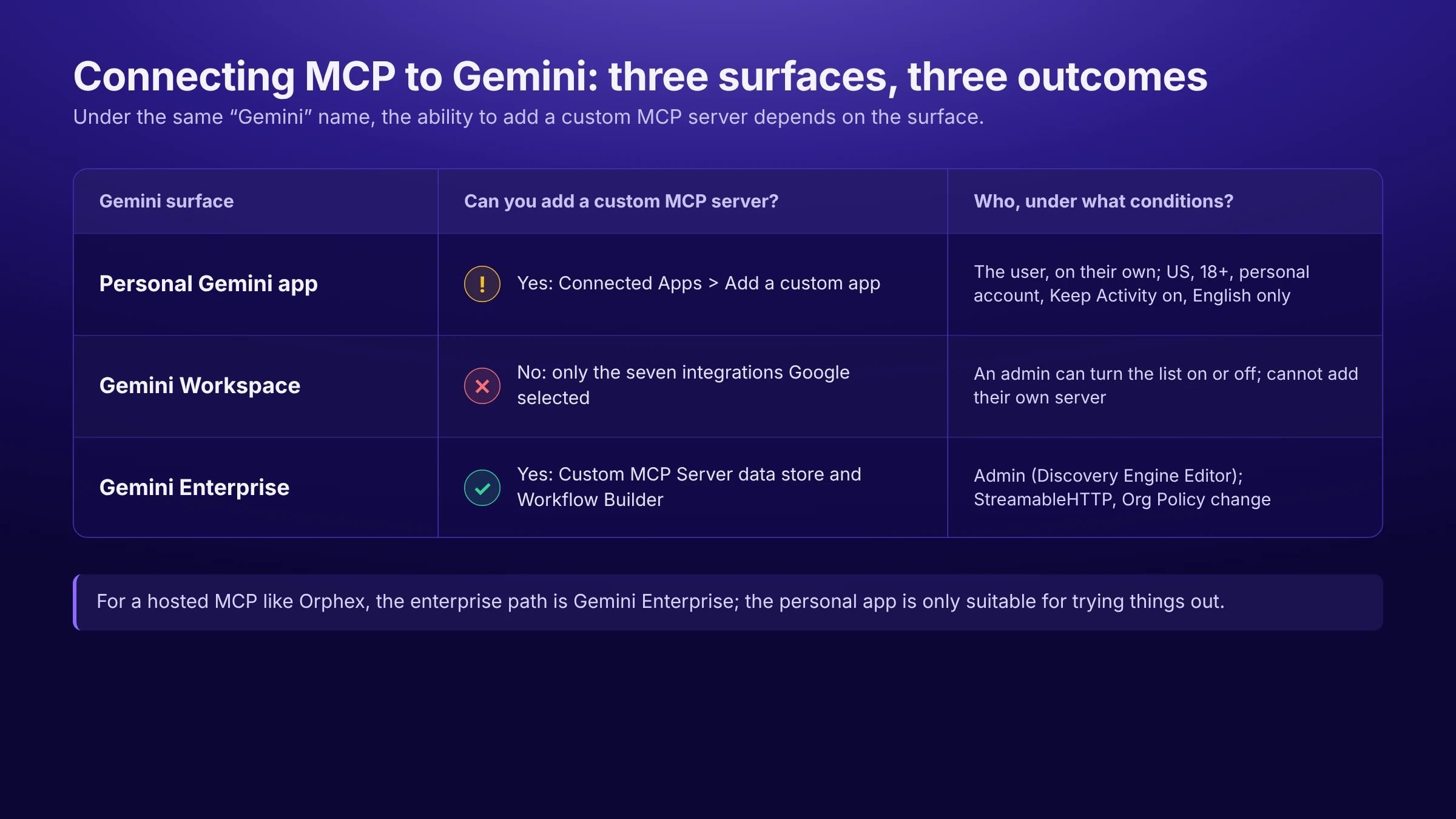
Personal Gemini app
In the consumer app at gemini web app, you can add any MCP server's URL by choosing "Add a custom app" in the Connected Apps section of the Settings menu. This is the only self-service path a user can complete on their own without waiting for admin approval.
However, this feature is not universal. Google's own sources define it only for users in the US, aged 18 or older, signed in with a personal Google account (not a work or school account), with the "Keep Activity" setting turned on; the feature works only in English, and the connection is set up through gemini web app (it can then be used in the mobile app as well). There is no official source showing that the feature works when you sign in with a company-issued Workspace account. So this path suits a marketer trying out MCP on their own personal account, but it was not designed for a team's shared, corporate workflow.
Gemini Workspace
Gemini in Google Workspace, which runs in the side panel of Gmail, Docs, Sheets, Drive, and Chat, does not offer an interface for adding an MCP server yourself. Instead, Google provides MCP connections only to seven third-party apps of its own choosing (Asana, Atlassian Rovo, HubSpot, Mailchimp, QuickBooks, Monday, Salesforce); an admin can turn these integrations on or off for users (according to Google's September 2026 announcement, they are on by default), but cannot add a server of their own choosing to the list.
Google's own sources do not fully agree on how much of these integrations is read-only: the announcement says users can "interact directly" with these apps, while the support pages say this is limited to read operations such as search and information lookup, and that changes cannot be made in the third-party app. Because a server like Orphex is not in this fixed list, there is currently no official way to connect it through Workspace.
Gemini Enterprise
Gemini Enterprise, formerly known as Google Agentspace, is the enterprise path where you can truly connect an arbitrary MCP server. An admin with the Discovery Engine Editor role can add any MCP-compatible server both as a "Custom MCP Server data store" (as a search and data source) and as an agent tool in Workflow Builder (as a step that can take action). The connection is made only over the StreamableHTTP transport and authenticated with one of No Authentication, OAuth 2.0, or Cloud Run + IAM (the Cloud Run + IAM option applies only to default .run.app addresses).
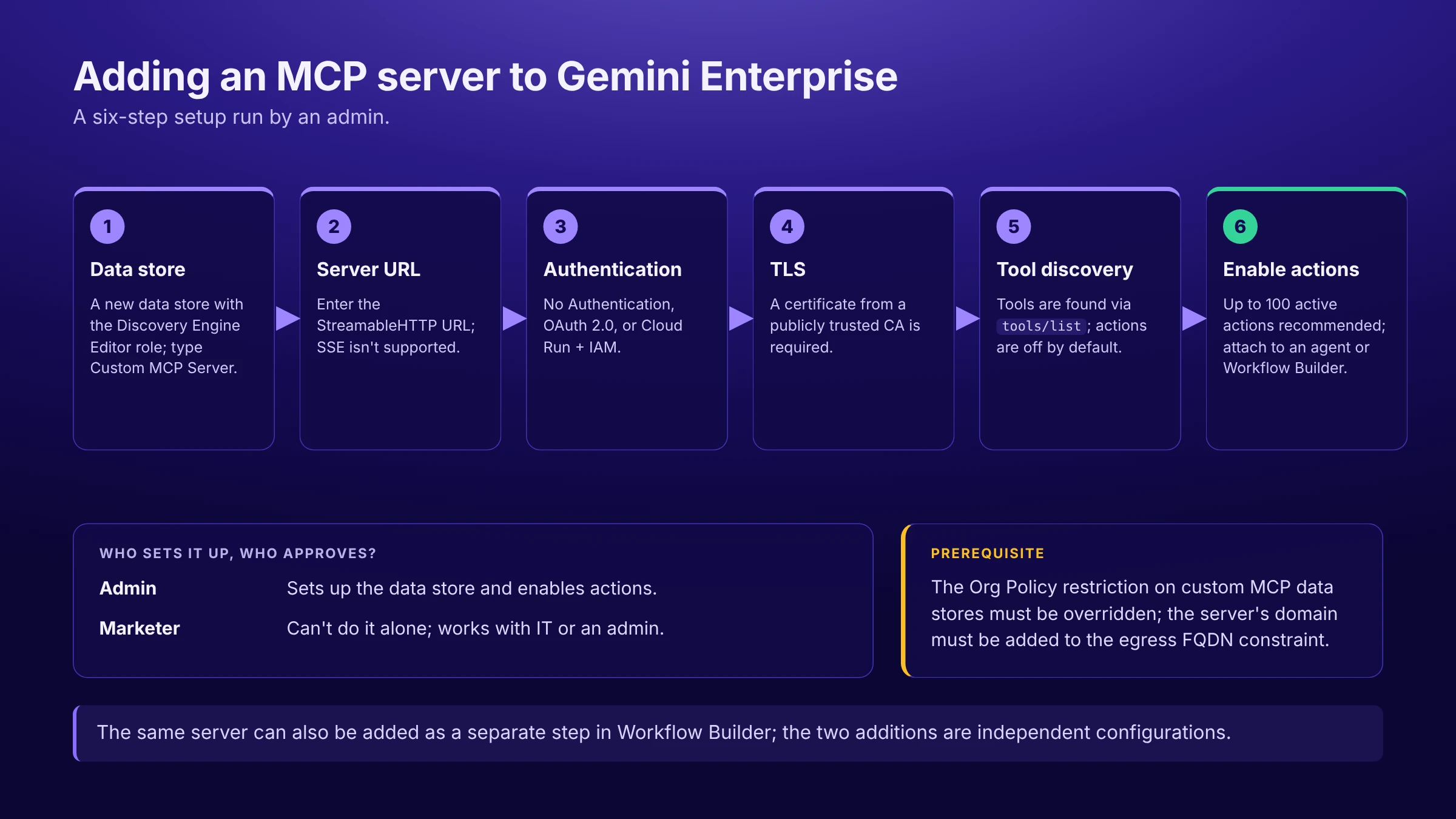
This is the path Google has validated when a company wants to connect a third-party hosted MCP server to Gemini in an enterprise, action-capable way. But it requires admin approval, a role assignment, and overriding the custom MCP data store restriction in Org Policy; the server's domain must also be added to the egress FQDN constraint. It is not a setup a marketer can finish alone in a few minutes.
If your team has software development resources, you can also connect an arbitrary MCP server through Gemini CLI, Google Antigravity, and Google's open-source Agent Development Kit (ADK). However, all three require config files or code changes and do not offer an interface a marketing team would use directly; that is why this guide mentions them not as a separate setup path but as a note: "possible if you have a developer team."
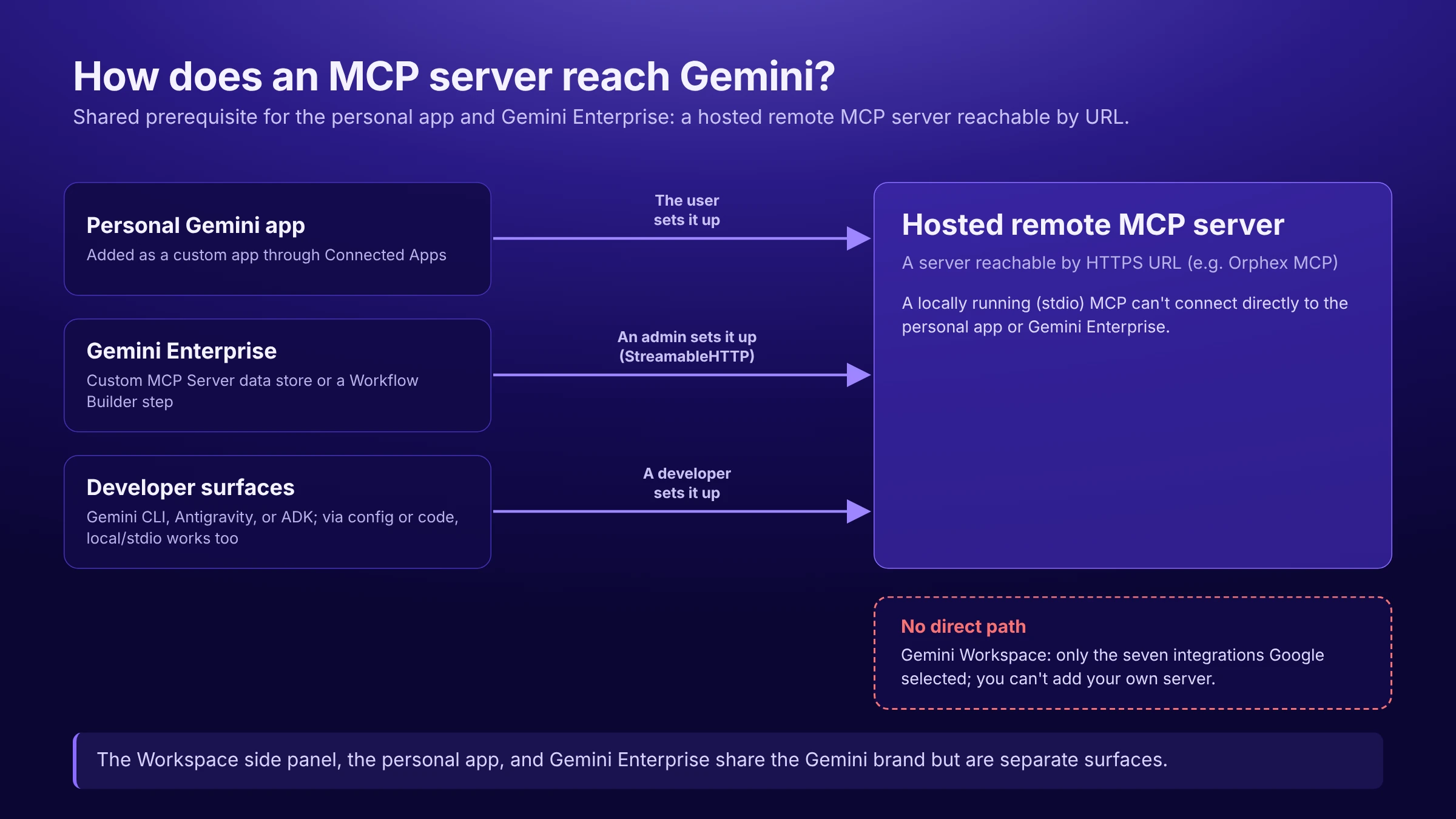
How do you connect an MCP server to Gemini?
There are two paths marketing teams can actually run on their own or together with IT: adding a custom app on a personal account, and connecting through an admin in Gemini Enterprise.
Adding a custom MCP server with a personal account
Sign in to gemini web app with your personal Google account and go to Connected Apps from the Settings menu.
Choose "Add a custom app" and enter the URL of the MCP server you want to connect.
If the server supports Dynamic Client Registration (DCR), the connection is set up automatically; if not, you need to enter the OAuth client details manually under "Advanced features."
Once the connection is set up, the app appears in the Connected Apps list and becomes available in chat.
Google gives a clear warning here: you, not Google, are responsible for controlling the third-party MCP server. The security and correct operation of the server are your responsibility (or that of the vendor providing the server to you). Gemini also asks for manual confirmation each time for write actions performed through this connection.
This flow is defined in the official source only for users who meet the conditions described above (US, 18 or older, personal account, "Keep Activity" on, English); there is no guarantee you will get the same result if you try the same steps with a Workspace account.
Connecting an MCP server in Gemini Enterprise
An admin with the Discovery Engine Editor role creates a new data store in the Gemini Enterprise panel and selects "Custom MCP Server" as the type.
The MCP server's URL is entered; the connection is accepted only over the StreamableHTTP transport, and the older SSE transport is not supported.
The authentication method is selected: No Authentication, OAuth 2.0 (optionally with PKCE), or Cloud Run + IAM. For OAuth, Gemini Enterprise must be registered as an OAuth client and the redirect URI must be defined.
The server's TLS certificate must be signed by a publicly trusted certificate authority; self-signed certificates are not accepted (private certificates are possible only for private servers routed through Agent Gateway).
Gemini Enterprise automatically calls the server's tools/list endpoint to discover the available tools and their parameters; actions come disabled by default and are enabled manually by an admin.
The recommended upper limit for performance is 100 active actions at a time.
The data store is attached to an agent; the same server can also be added as a separate step in Workflow Builder, as an agent tool that can take action. These two additions are independent configuration steps.
What should you look for when choosing an MCP server for Gemini?
Which Gemini surface will your team use: is the consumer app enough for personal exploration, or do you need Gemini Enterprise for a company-wide setup?
Do you need only data and reporting, or write permission that can make changes in an account?
Is the MCP server you want to connect a hosted remote server, or does it run local/self-hosted? The personal Gemini app and Gemini Enterprise expect a hosted server reachable by URL; you cannot plug a locally running MCP directly into them.
Does the vendor list Gemini (or a specific Gemini surface such as Gemini CLI) as an officially named supported client, or does it only use a generic statement such as "works with any MCP-compatible client"? The two do not carry the same level of assurance.
Which authentication method does the server require, and does it match what the Gemini surface you plan to use supports (OAuth+DCR, static header, no auth)?
Does setup require admin approval, or is it a flow a user can complete on their own?
What can marketers actually do with Gemini and MCP?
Cross-platform performance comparison (Orphex)
"Which ad channel delivered the best result relative to its budget this month?" Here the MCP combines data from different platforms into a single structured query; it is Gemini itself that draws the cross-channel comparison from this data.
Ready-made findings and anomaly detection (Orphex)
"Which campaigns have an unexpected deviation, and where should I look?" Here the answer does not come only from Gemini interpreting raw data; the ready-made finding Orphex calculates in its own analysis layer is passed through the MCP.
SEO and domain comparison (Semrush / Ahrefs)
"Compare our organic traffic with our competitor's domain." The MCP returns keyword and backlink data in a structured form; Gemini does the comparison, and no separate ready-made analysis layer on the vendor side is verified.
CRM and pipeline visibility (HubSpot)
"List this week's open deals and their status." The MCP reads CRM data directly from HubSpot; some revenue and email metrics come partly calculated on the vendor side.
Lifecycle campaign and flow queries (Klaviyo)
"How are the open and click rates of our latest automation flow doing?" The MCP provides segment and flow performance as structured data; when needed, an operational change to a campaign or flow can also be made over the same connection.
Google Ads account reporting (Google Ads)
"Summarize the campaign and keyword structure in my account." Here the MCP provides read-only structured reporting; diagnostic recommendations such as identifying underperforming items run not in the MCP itself but in a separate Agent Skill layer.
Meta campaign and catalog operations (Meta Ads)
"Pause that underperforming ad." This is a request that engages the MCP's action layer; Meta's official hosted MCP can trigger real changes in campaign and catalog operations beyond reporting.
Multi-app automation (Zapier)
"Add this lead to the CRM and let the team know in Slack." Zapier does not provide reporting on its own; the layer the MCP offers here is triggering a chain of actions across different apps.
How do these MCP servers connect to Gemini?
Both the personal Gemini app and Gemini Enterprise expect a hosted remote MCP server reachable by URL. So for a vendor to connect to Gemini in practice, it first needs to offer a hosted server; whether the vendor officially names Gemini is a separate question.
MCP | Hosted remote MCP available? | Gemini status in official sources | Key note |
|---|---|---|---|
Orphex | Yes | A technical connection path exists on the Google side | See the Orphex section below for details |
Semrush | Yes | Unclear/variable | Current technical documentation says Gemini CLI support has ended and points to Antigravity, while the general marketing page still lists the name "Gemini" generically |
Ahrefs | Yes | Not named | Only Claude Desktop and Cursor are named in official sources |
HubSpot | Yes | Named but narrow | Appears only in a single tool description as "Claude, ChatGPT, Gemini"; no separate Gemini setup page; also listed separately in Gemini Enterprise's ready-made connector catalog and among Workspace's seven integrations |
Google Ads | No (local/self-hosted by default) | Shifted to Antigravity CLI/Code Assist | Officially named support now points to Antigravity, not Gemini CLI |
Meta Ads | Yes | Not named | Only the generic statement "works with any MCP-compatible agent" |
Klaviyo | Yes | Not named | The Gemini name does not appear in any of the four separate official sources |
Shopify | Variable (Dev MCP and commerce surfaces differ) | Partial (Dev MCP only) | Dev MCP added Gemini CLI to its official list; no such naming on commerce surfaces like Storefront/Checkout |
Zapier | Yes | Named (Gemini CLI) | "Gemini CLI" is explicitly included in the official list of roughly 23 clients |
Slack | Yes (but with restrictions requiring admin approval) | Not named | The registered app/admin approval requirement makes even theoretical compatibility more restricted than the standard scenario |
We did not add a Workspace column to the table because the situation there is the same for every vendor: apart from the fixed seven integrations Google has chosen, no MCP server, whichever vendor it comes from, can be connected there. The "named" rows are also generally specific to Gemini CLI; extending that automatically to the personal Gemini app or Gemini Enterprise would not be accurate, because these are separate Google surfaces and vendors' naming usually does not make clear which surface they mean.
How do MCP servers differ in data, ready-made analysis, and action?
MCP | Structured reporting | Ready-made analysis | Write/action |
|---|---|---|---|
Orphex | Yes | Yes (ready-made findings calculated in Orphex's own analysis layer) | Yes (conditional) |
Semrush | Yes | Could not be verified | No |
Ahrefs | Yes | Could not be verified | Could not be verified |
HubSpot | Yes | Partial (revenue/email metrics) | Yes (CRM records) |
Google Ads | Yes | No (exists in a separate Agent Skill layer, not in the MCP itself) | No |
Meta Ads | Yes | Partial (signal health, measurement studies) | Yes |
Klaviyo | Yes | Could not be verified | Yes |
Shopify | Yes | Could not be verified | Variable (depends on the surface) |
Zapier | No (no reporting layer of its own) | No | Yes (multi-app action layer) |
Slack | Yes (search/read) | No (interpretation happens in the AI client) | Yes |
Google Ads is an example that needs attention here: some diagnostic logic (for example, identifying underperforming headlines) lives not in the MCP server itself but in a separate Agent Skill layer. Presenting the two as the same thing would make the MCP look like it can do something it cannot actually do.
Which MCP fits which use case?
If you want cross-platform budget and performance visibility, Orphex brings different ad channels together in one place.
For in-depth keyword and backlink analysis on the SEO side, Semrush or Ahrefs; both offer broad structured reporting in this area.
If your team works with CRM and lifecycle data, HubSpot makes sales and marketing data accessible through the same MCP.
To query Google Ads account structure and official recommendations, Google's own MCP is read-only but a direct official source.
To manage Meta ad operations (campaigns, creative, catalog), the Meta Ads MCP covers both the reporting and the action side.
To manage email and SMS flows, Klaviyo stands out with its operational write permission.
When working with Shopify store data, you need to determine clearly which MCP surface you need (the Dev MCP, or a commerce surface such as Storefront/Checkout).
For automations that connect different marketing tools, Zapier provides a broad action layer even though it offers no reporting of its own.
For internal notification and search needs, Slack adds value more on the coordination side than in marketing analysis.
This is not a "single best option" list; most teams use several of these MCP servers at once, for different needs.
How can Orphex MCP be used with Gemini?
Cross-platform data
Orphex makes data from different ad platforms, analytics sources, and e-commerce systems accessible through a single MCP. When you ask Gemini something like "which channel was spent most efficiently this month," the answer is shaped not by a single platform's data but by all the connected sources.
Ready-made marketing intelligence
Alongside raw data, Orphex also gives Gemini the findings the platform calculates itself: where budget is being wasted, which creative is fatigued, and which campaign deviates from expected performance. This is a different layer from Gemini interpreting the data on its own.
Controlled action
Write access is not on by default for every user; whether write permission is enabled depends on plan and workspace settings, and its scope depends on the platform you connect. Even when these conditions are met, a change is not applied directly: it is first previewed, then approval is requested, every applied operation is logged, and an additional human approval comes into play if your workspace rules require it. Partial rollback is possible in supported cases; the scope varies by operation type. For example, a newly created asset starts paused, and approval does not mean it automatically goes live.
There is no separate charge for MCP in Orphex. Whether write permission on ad accounts is enabled depends on plan and workspace settings. Some analysis operations may consume AI credits.
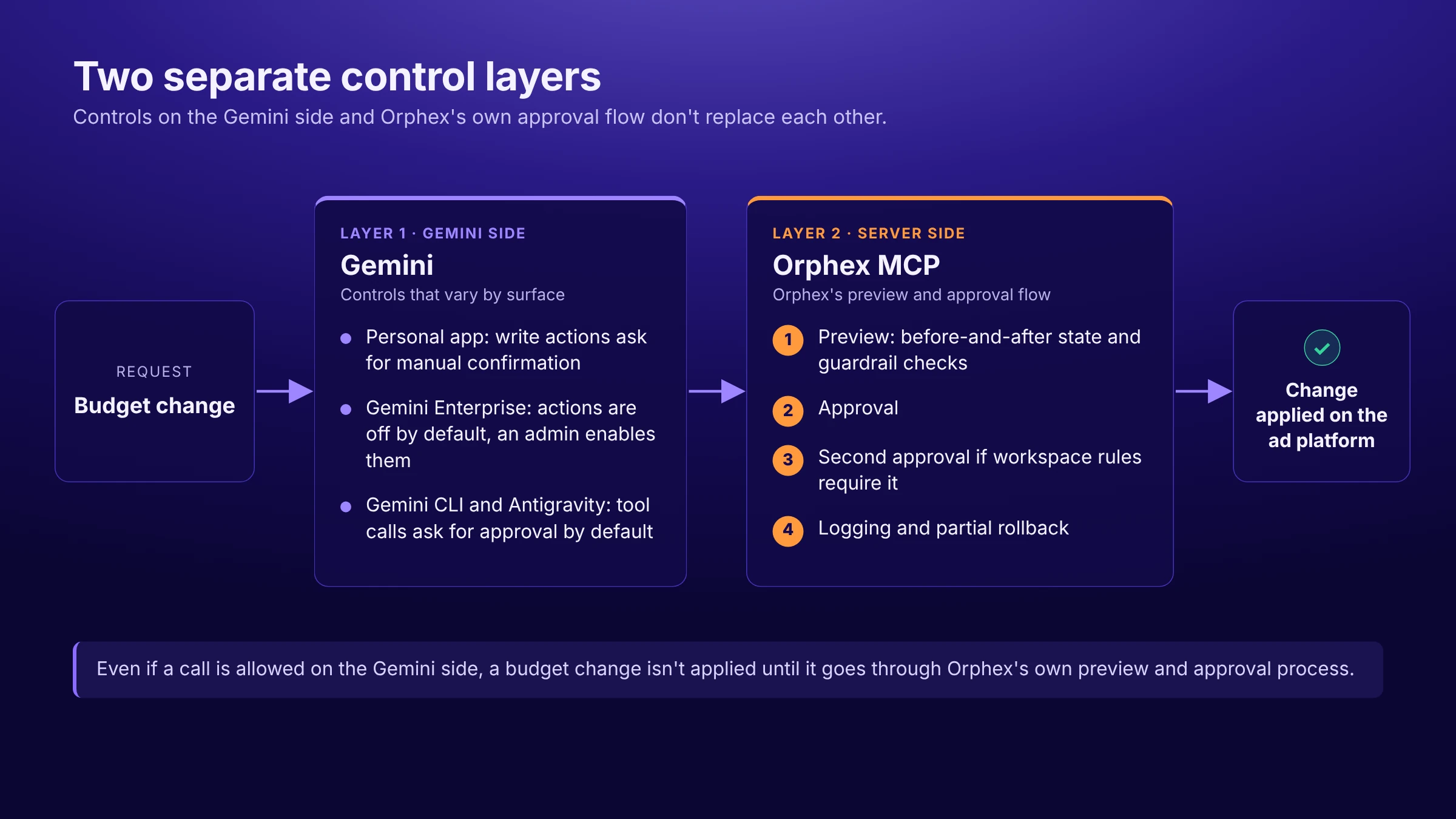
The reality of connecting to Gemini
It is important to separate the technical paths on the Google side from Orphex's own announced support status; what follows describes the connection possibilities Gemini's infrastructure allows.
In the personal Gemini app, Orphex's MCP server URL can technically be added through Connected Apps, but this is possible only in the US, with a personal Google account, and it is not a recommended path for an enterprise production setup. There is no path through Gemini Workspace; Orphex is not in the fixed list of seven integrations Google has chosen. In Gemini Enterprise the situation is different: an admin can add Orphex's MCP server over StreamableHTTP and OAuth 2.0 (or Cloud Run/IAM) as both a data source and a Workflow Builder step that can take action; this is the real way to connect Orphex in an enterprise Gemini setup. If your team has developer resources, a technical connection is also possible through Gemini CLI, Antigravity, or ADK, but this is developer infrastructure, not a flow a marketing team would set up on its own. Vertex AI Agent Builder/Gemini Enterprise Agent Platform has an MCP client mechanism, but since it could not be verified in official sources whether an arbitrary third-party server like Orphex can be added there, we do not count it as an Orphex connection path.
This technical possibility does not mean Orphex has officially announced every Gemini surface; when deciding which Gemini setup is right for you, we recommend clarifying the right surface together with your Orphex team.
Conclusion
Using MCP in Gemini is not about going through a single setup screen; it is a decision that changes depending on which Gemini you use, whether you work with a personal or enterprise account, and whether your need is data or action. For personal exploration, the consumer app's custom app feature may be enough; for a company-wide, action-capable setup, the path runs through Gemini Enterprise.
Which MCP server you choose likewise depends on your need: do you want only reporting, or controlled write permission together with ready-made cross-platform findings? Orphex is one of the servers aiming to offer both together; if you want to clarify which Gemini surface and which scope you will use it in, we can talk with your team over a demo.
Frequently asked questions
Does Gemini support native/local MCP?
Yes, but this mainly applies to developer surfaces. Gemini CLI, Antigravity, Gemini Code Assist (except Android Studio), and ADK support local/stdio MCP connections. The personal Gemini app and Gemini Enterprise, however, can connect only to a hosted remote server; you cannot connect a locally running MCP directly to either of them.
Is using MCP in Gemini free?
Google's official sources do not state a separate MCP fee for the custom MCP feature in the consumer Gemini app; however, the minimum plan required for this feature could not be pinned down either. On other Gemini surfaces, cost varies by the plan or Google Cloud billing terms of the product in use. The connected MCP server's own pricing may also apply separately.
Can Gemini take write/action steps through MCP?
It varies by surface. In the personal Gemini app, write actions ask for manual confirmation. In Gemini CLI and Antigravity, tool calls ask for user approval by default. For the seven Gemini Workspace integrations, Google's help page says only read operations are supported, while the announcement uses a broader "interact directly" wording. In Gemini Enterprise, MCP steps added through Workflow Builder can take action. However, the client-side approval/confirmation behavior for these MCP steps in Gemini Enterprise could not be clarified in official sources.
Is MCP support the same in Gemini CLI and the Gemini web app?
No. Gemini CLI is a separate developer tool that runs in the terminal and uses its own config file. The personal Gemini web app (gemini.google.com) is a completely different interface that works through Connected Apps. Although both carry the same "Gemini" brand, the way you set up an MCP connection, the config format, and the target audience are separate.
Are Gemini Enterprise and Vertex AI Agent Builder (Gemini Enterprise Agent Platform) the same thing?
No, they are separate products, but their names are very similar. Gemini Enterprise (formerly Google Agentspace) is the end-user-facing enterprise AI platform where an admin can add any MCP server. Gemini Enterprise Agent Platform is a separate platform where developers build agents; it has an MCP client mechanism, but support for arbitrary third-party servers was not verified in official sources. It is important not to confuse the two when choosing the right setup path.
