With MCP (Model Context Protocol), you can connect Claude to your advertising, analytics, CRM, and SEO accounts. That way Claude can reach the data you authorize directly, and depending on the capabilities the MCP in question offers, it can also carry out operations on the connected platforms.
Not every MCP server opens the same scope to Claude. Some solutions stay limited to data access and reporting, while others also support write operations such as updating CRM records or changing ad budgets. Some MCPs also hand Claude ready-made output produced by the platform's own analysis system instead of raw data. That is why the right MCP choice depends on the use case.
In this guide we compare the 10 official MCP solutions that stand out for marketing teams, then look at the setup process on the Claude side. Custom connector setup, plan and admin requirements, the difference between local and remote connections across claude.ai and Claude Desktop, the OAuth flow, and which MCPs offer an officially documented connection path for Claude are all part of this comparison.
Which MCP Server Stands Out for Which Job in Claude?
Orphex stands out for multi-channel ad performance; Semrush and Ahrefs for SEO and search data; HubSpot for CRM; and Klaviyo for lifecycle marketing. Google Ads MCP focuses on search advertising reporting, Meta Ads MCP on ad, catalog, and measurement operations, Zapier on cross-app action, Slack on team context, and Shopify on agentic commerce.
Orphex MCP: Multi-channel performance marketing.
Orphex MCP can compare connected ad platforms within the same question, and when needed it can bring data from web analytics, mobile measurement, and connected revenue sources into the same analysis.
Calculations such as anomaly detection, pacing and forecasting, creative performance, and impact analysis are done in Orphex's own analysis layer.
Campaign, budget, and creative changes can be applied through a preview and approval flow.
It can be added to Claude as a custom connector.
Semrush MCP: SEO, content, and market data.
Semrush MCP brings keyword, organic competitor, backlink, and traffic data directly into Claude.
It works read-only and makes no changes in the Semrush account.
Semrush publishes official setup documentation for Claude and Claude Code
HubSpot MCP: CRM, campaigns, and marketing email.
With HubSpot MCP you can query pipeline data, review campaign performance and revenue attribution, check email performance, and update CRM records.
It has both read and write capability.
The HubSpot remote MCP documentation explains connection steps in detail.
Google Ads MCP: Search advertising reporting.
Google Ads MCP makes the reporting capabilities of the Google Ads API usable through natural language.
It works read-only and cannot make changes in the ad account.
Because the server runs locally by default, it has to be hosted in a remote environment reachable from the internet in order to be used through claude.ai.
Official source: Google Ads MCP server: Developer integration guide
Meta Ads MCP: Meta ad, catalog, and measurement operations.
Meta Ads MCP supports operations such as creating and editing campaigns, managing catalogs, reviewing signal health, running A/B tests and conversion lift studies, and viewing change logs through the same connection.
The server is hosted by Meta and runs remotely.
Official source: Meta Ads MCP Server overview.
Klaviyo MCP: Email and SMS lifecycle marketing and reporting.
Campaign and flow performance reports along with segment and form metrics can be queried in natural language.
Agencies can connect multiple client accounts to the same assistant and compare across accounts.
It has both read and write capability. A separate ready-made analysis layer was not verified; the MCP fetches the report data and Claude does the interpretation.
Klaviyo publishes official setup guides for Claude and Claude Desktop.
Shopify MCP: Agentic commerce and Shopify development.
Shopify MCP does not refer to a single server; Shopify has several official MCP surfaces serving different purposes.
For marketers, the relevant commerce capabilities cover searching the store catalog, accessing product details, creating and updating carts, searching store policies, and checkout steps.
Shopify's official MCP surfaces include no tool that gives the merchant a sales or campaign performance report.
Shopify's AI Toolkit documentation officially lists Claude Code for Dev MCP.
Zapier MCP: Taking action across multiple apps.
Instead of exposing its own data, Zapier MCP makes it possible to carry out operations in the apps connected to your Zapier account.
According to the official documentation, it covers more than 9,000 apps and more than 40,000 actions.
It has no reporting or interpretation layer of its own, and successful tool calls draw down the task quota on your plan.
Zapier publishes official setup paths for Claude, Claude Code, and Claude Cowork.
Slack MCP: Team context and decision history.
Slack MCP makes it possible to search and read campaign and project discussions, briefs, and past decisions in the Slack archive.
Alongside that, in-Slack actions such as sending messages, creating channels, adding reactions, and creating or updating canvases are also supported.
It does not provide marketing performance data.
Slack's official developer documentation lists Claude.ai and Claude Code among the supported clients. A connection guide for Claude has also been published.
Ahrefs MCP: SEO and search visibility reporting.
Through Ahrefs MCP, backlink and referring domain reports, keyword research, SERP overviews, rank tracking, Site Audit findings, Web Analytics breakdowns, Google Search Console data, and batch domain analyses can be queried from inside Claude.
It stands out on filterable and groupable reporting. It is available on Lite and higher paid plans, and queries are consumed from the monthly API unit quota.
Ahrefs publishes separate official setup guides for Claude Web, Claude Desktop, Claude mobile, and Claude Code.
What Is MCP and Why Do Marketing Teams Use It?
MCP (Model Context Protocol) is an open standard that lets an AI assistant access a platform's data and tools with proper authorization. When you connect to an assistant like Claude over MCP, you can query the data in the marketing accounts you authorize without exporting it manually.
In marketing teams, analysis usually means pulling the data out of the platform, cleaning it up, and then handing it to an AI. With an MCP connection, the question can be put directly to the connected source. For example, you can ask Claude, "Which campaigns are wasting spend against the account average over the last 28 days?" and then ask follow-up questions on that same data.
Two distinctions matter here:
The scope reachable over MCP does not cover the entire platform. Each platform opens specific data and capabilities to access over MCP. So the fact that a feature exists in a platform's own interface does not mean it is also usable over MCP.
In an MCP connection, write permission matters as much as access scope. An MCP that works read-only can read the data in the platform but cannot make changes. An MCP with write capability can also make changes in the areas it supports. The risk and control requirements of these two usage models are therefore different.
If you want to compare MCP servers independently of Claude in terms of data access, ready-made analysis, and action capabilities, take a look at our MCP servers comparison for marketing teams.
How Does MCP Setup Work in Claude?
The main route for MCP setup in Claude is adding a custom connector. On claude.ai, you can establish the connection by adding the remote MCP server's URL in the Customize > Connectors section. You don't need to write code, install a package, or switch into a separate developer mode for this.
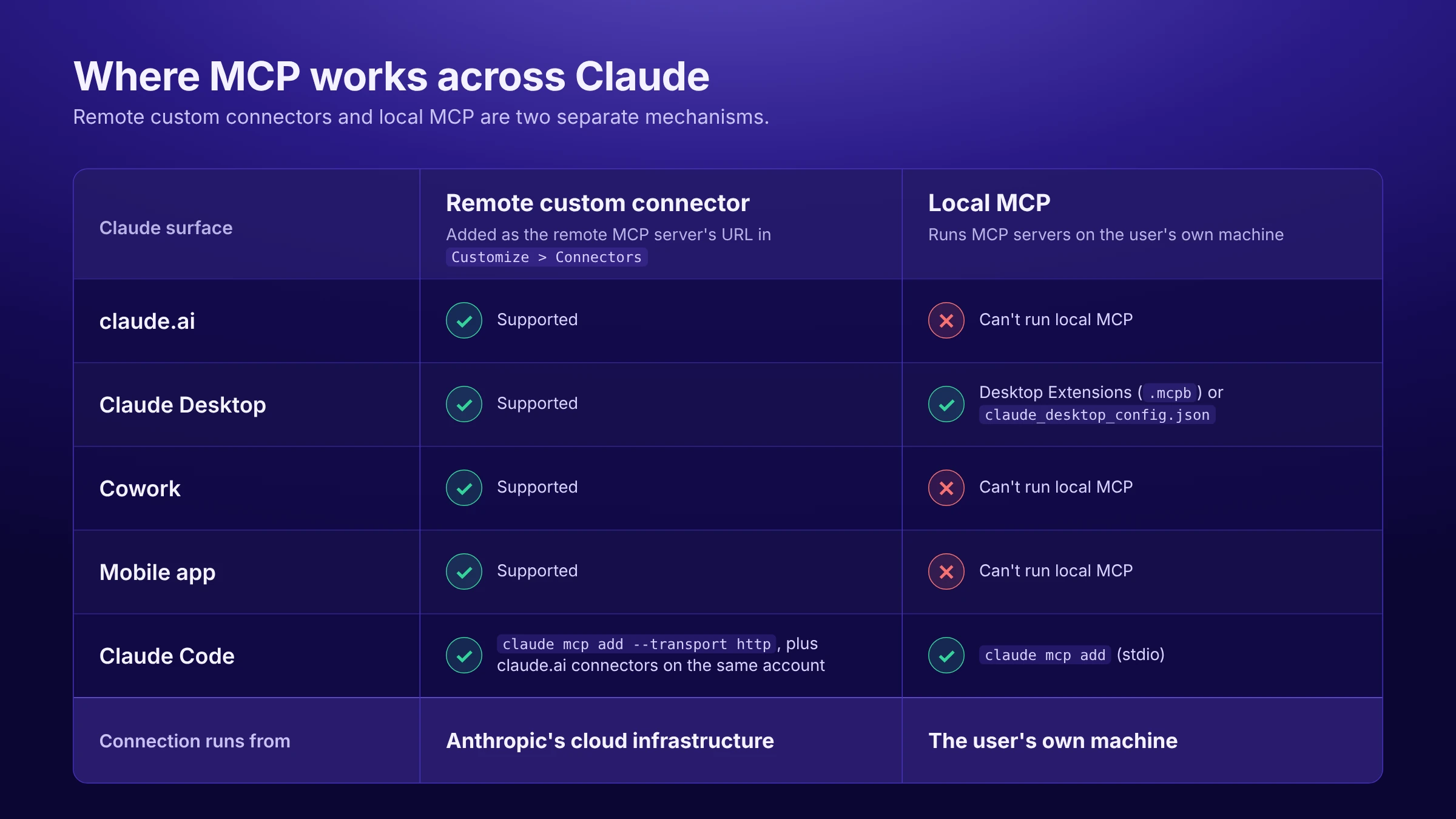
Remote and local MCP connections are kept separate across Claude's different surfaces. claude.ai, Claude Desktop, Cowork, and the mobile app all use the same custom connector mechanism. Claude Desktop and Claude Code can, in addition, run local MCP servers. Custom connectors and local MCP are two different mechanisms.
What Is a Claude Custom Connector?
A Claude custom connector is a remote MCP server that you add to Claude yourself. What makes it different from the connections in Claude's built-in connector directory is that you enter the server's address and, where required, the authentication details.
Once the connection is established, Claude automatically discovers the tools the server exposes. You can manage which connector is active in which chat from the Connectors section in the + menu of the chat interface.
How Do You Add an MCP Server to Claude?
On the Free, Pro, and Max plans, the setup steps are as follows:
Open the
Customize > Connectorsin Claude.Click the "+" option.
Select "Add custom connector".
Enter the remote MCP server URL.
If required, add the OAuth Client ID and Client Secret under "Advanced settings".
Add the connector with "Add".
Complete the authentication step for the relevant account from the connector card.
Once a custom connector has been added, its details can't be edited directly. If you need to change something, you have to remove the connector and add it again. You can find the complete setup steps in Anthropic's custom connector guide.
Do You Need Developer Mode for MCP in Claude?
No. You don't need to turn on a separate Developer Mode to set up a custom connector on claude.ai. There is no such step in the official setup flow.
This is often confused with the Developer Mode concept in ChatGPT; that mechanism does not belong to Claude. In the same way, config.toml is not a configuration file Claude uses.
In Claude Desktop there are two separate sections that can be mixed up. The Extension Developer section under Settings > Extensions > Advanced settings is only used to install an unsigned or custom .mcpb desktop extension. Developer settings in the desktop app, on the other hand, is for viewing MCP connection status and logs. Neither section is a prerequisite for custom connector setup.
How Does MCP Differ Across Claude Free, Pro, Max, Team, and Enterprise?
Custom connector support is available on all plans, including Free. The main differences between plans are connector limits and who is allowed to add a connector.
Plan | Custom connector status |
|---|---|
Free | The user can add their own connector; there is a limit of 1 custom connector |
Pro / Max | The user can add their own connector |
Team / Enterprise | The connector is added by an Owner or Primary Owner (on Enterprise, also by users with a custom role that allows it); members then connect with their own accounts |
On the Team and Enterprise plans, not everyone on the team can add a custom connector. Setup is done by people who hold the Owner or Primary Owner role in the organization. These are the account administrators with permission to manage organization settings in Claude. On the Enterprise plan, users with a custom role that includes the Manage access to Libraries permission can also add connectors. They click Add in the Organization settings > Connectors section, follow the Custom > Web path, and add the remote MCP server URL. Team members then connect with their own accounts later by clicking Connect on the connector listed on their own Customize > Connectors page.
Claude's plan requirements and the requirements of the MCP provider you connect to are separate things. Even if the Claude Free plan allows you to add one custom connector, the MCP provider may require a paid Claude plan, a specific plan in its own product, or a specific account role for the connection. Klaviyo, for example, ties the use of a custom connector for multi-account connections to a paid Claude plan. So for each MCP you also need to check the provider's own plan and account requirements separately.
Does Claude Support Local MCP?
Yes, but not on every Claude surface. Local MCP is available only in Claude Desktop and Claude Code. claude.ai and Cowork can't run local MCP.
The difference between remote and local connections is as follows:
Remote custom connector: Available on claude.ai, Claude Desktop, Cowork, and the mobile app. The connection originates from Anthropic's cloud infrastructure.
Local MCP: Can be set up in Claude Desktop through Desktop Extensions (
.mcpbpackages) orclaude_desktop_config.json, and in Claude Code with theclaude mcp addcommand. These connections run on the user's own machine.
To set up local MCP in Claude Desktop, you can install a ready-made extension with the Browse extensions option in the Settings > Extensions section. To add a custom .mcpb file, the Advanced settings > Extension Developer path is used. On the Team and Enterprise plans, Owners and Primary Owners can turn public extensions on and off and upload .mcpb files specific to the organization.
You can find the detailed setup steps in Anthropic's Claude Desktop local MCP guide.
Is MCP Setup in Claude Desktop the Same as in claude.ai?
Not exactly. Claude Desktop can use remote custom connectors and, on top of that, also offers local MCP support. claude.ai supports remote custom connectors but can't run local MCP.
When a remote custom connector is used in Claude Desktop, the connection originates from Anthropic's cloud infrastructure, not from the user's computer. So using the desktop app does not mean the MCP connection runs locally. Local MCP servers defined with claude_desktop_config.json are a separate mechanism and can't be used on claude.ai or in Cowork.
How Do You Add MCP with Claude Code?
In Claude Code, MCP is added from the command line. For a remote server:
claude mcp add --transport http <SERVER_NAME> <MCP_URL>For a local (stdio) server:
claude mcp add <SERVER_NAME> -- <COMMAND>claude mcp list can be used to verify the connection. Within a session, the /mcp command lets you select the server and complete the Authenticate step. On the configuration side, ~/.claude.json and project-specific <project>/.mcp.json files are used. claude mcp add, meanwhile, uses the local scope by default, which applies only in the project where it was added. The details are in the Claude Code MCP documentation.
For marketing teams, Claude Code is not a separate alternative product; within the Claude family it is an MCP surface aimed more at developers. When you sign in to Claude Code with the same Claude.ai account, the MCP connectors added to claude.ai are automatically available there as well, and a second setup isn't needed. However, the fact that an MCP is officially documented only for Claude Code does not mean it is supported on Claude's other surfaces.
How Does Claude MCP OAuth Work?
Claude supports OAuth for MCP connections. After adding the connector you click its card, you're redirected to the relevant app's own sign-in screen, you approve the required permissions, and the connection is completed. Your password is not entered into Claude during this process.
The mechanisms Claude supports include current OAuth specifications, Dynamic Client Registration (DCR), token refresh, and manual Client ID / Client Secret entry for servers that don't support DCR. On claude.ai, a request header authentication feature is also supported for servers that use a static API key or bearer token.
Claude supporting these auth methods does not mean every MCP server will work with all of them. The server determines which authentication method is used. Some servers work only with registered applications, some don't support DCR, and some restrict on their own side which clients can connect.
Why Does an MCP Server Added to Claude Need to Be Reachable Externally?
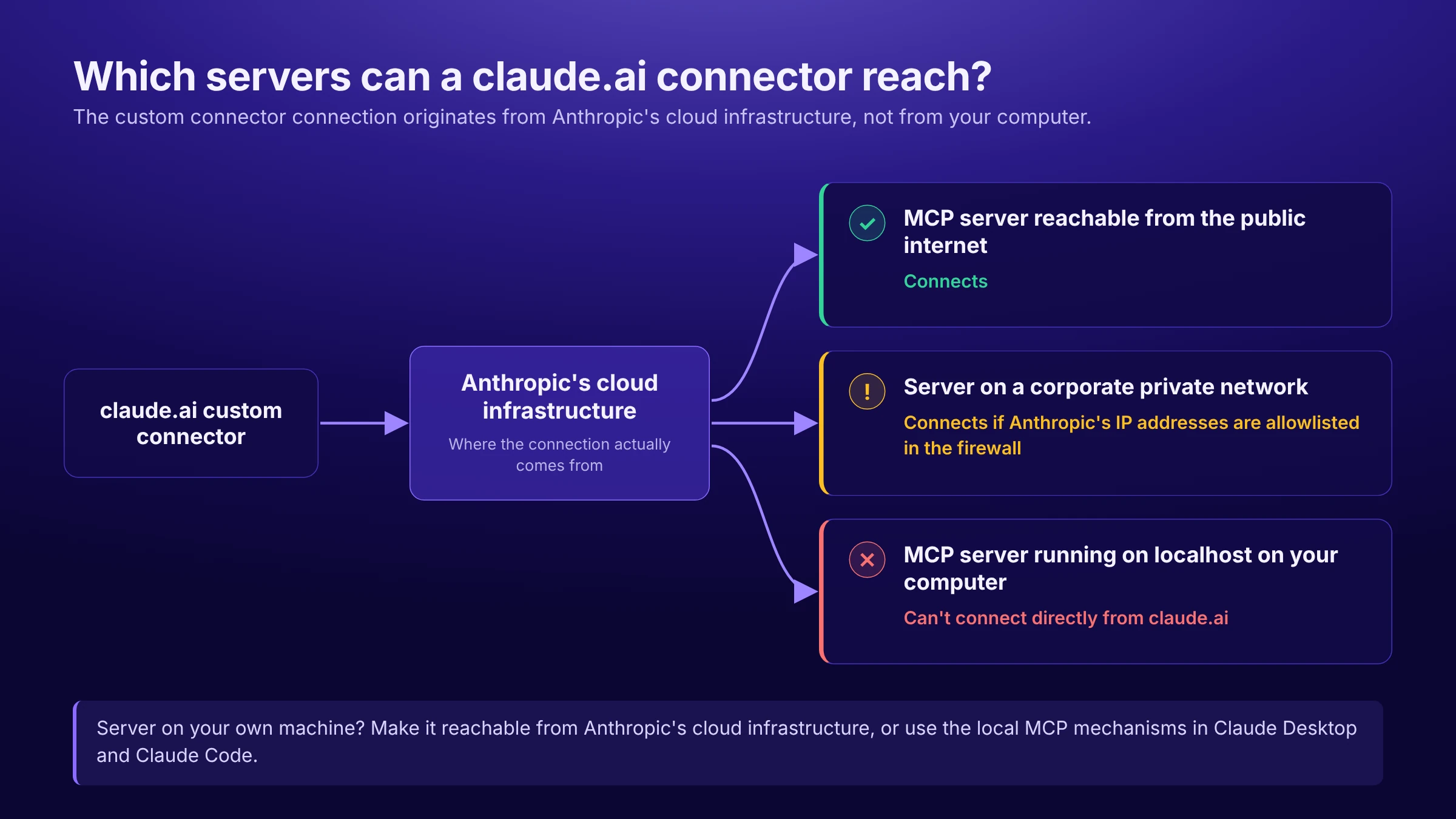
The custom connector connection on claude.ai originates from Anthropic's cloud infrastructure, not from the user's computer. The MCP server therefore has to be reachable from Anthropic's cloud infrastructure.
That's why you can't connect directly from claude.ai to an MCP server running on localhost on your own computer. For access to a server on a corporate private network, allowlisting Anthropic's IP addresses in the firewall is officially documented. If you want to use a server running on your own machine with Claude, you can make the server reachable from Anthropic's cloud infrastructure, or you can use the local MCP mechanisms in Claude Desktop and Claude Code.
How Does Claude Control Tools Once the Connection Is Established?
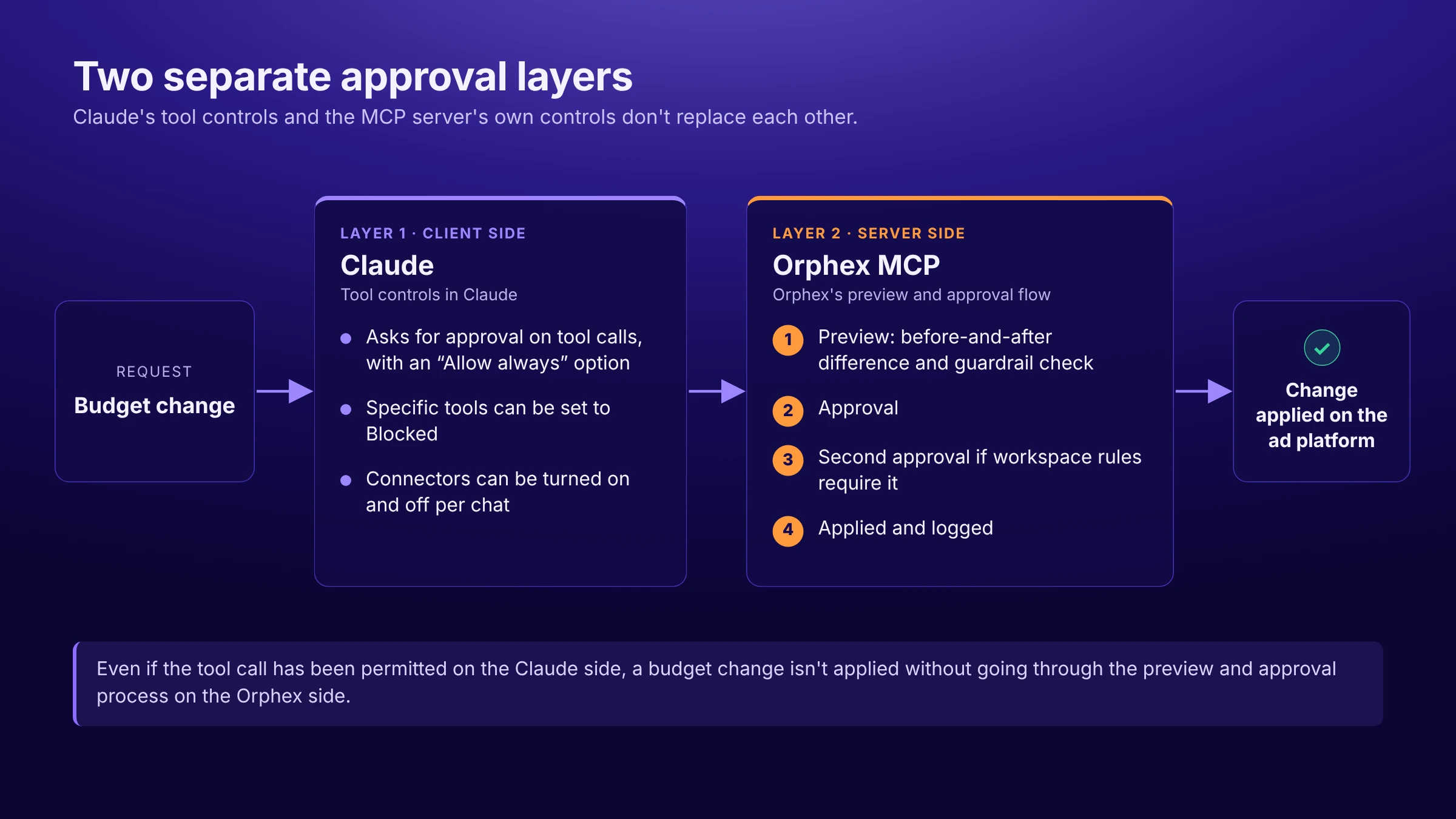
Once the connection is established, Claude can control tool usage in several different ways. It can ask the user for approval on tool calls and offer an "Allow always" option. In the Customize > Connectors section, you can select a connector and set the permission for specific tools to Blocked. Connectors can be turned on and off per chat. On the Team and Enterprise plans, Owners can disable some interactive tool calls from the organization settings.
Claude Research is an important exception in this approval flow. While Research is running, connector tools can be called automatically without additional approval. For this reason, Anthropic recommends that tools with write capability be managed carefully in Research usage and turned off where necessary. If you're using an MCP with write permission, this behavior is worth evaluating separately during setup.
These are the controls on Claude's client side. If the MCP server you connect to has its own preview, approval, or logging mechanisms, those form a separate layer of control. Claude's controls and the MCP server's own controls do not replace each other.
What Can Marketers Actually Do with Claude and MCP?
The real value of MCP in marketing isn't just "talking to an AI"; it's being able to run a significant part of daily analysis and operational work in natural language. The examples below are based on the capabilities of the MCP solutions covered in this article as stated in official sources.
In these examples, Claude takes the question, uses the relevant tool the connected MCP server exposes, and passes the result back to the user. The accessible data, ready-made analysis, and operational capabilities are therefore not Claude's own native features; they depend on the scope the MCP server you connect provides.
Comparing performance across platforms (Orphex). You can ask Claude, "Compare Meta and Google side by side for the last 28 days." Orphex can use data from connected ad platforms in the same analysis. In the comparison, differences that affect metrics, such as the attribution window, currency, or campaign objective, are taken into account and stated along with the result.
Finding wasted spend (Orphex). For questions like "Where is budget being spent inefficiently?", Orphex examines account data with its own ready-made analysis flows to surface where the budget is being used inefficiently.
Assessing creative performance (Orphex). "Is the creative fatigued, which one should I change?" The analysis shows which creative attribute affects which metric and by how much, how it differs from the segment average, and how many creatives the result was calculated across. Sample size matters here: a difference derived from two creatives and a result derived from two hundred creatives can't be judged with the same confidence.
Seeing whether you'll hit your target (Orphex). "At this rate, will we hit the Q3 target?" The answer isn't based on a generic AI estimate but on pacing and forecasting calculated from the goal-tracking data defined in the account.
Bringing non-advertising data into the same analysis (Orphex). "Spend went up but revenue is flat, where's the problem?" Alongside connected ad platforms, GA4 traffic, mobile measurement cohorts, catalog and feed sources, and subscription revenue can be used in the same analysis. The scope depends on the workspace; only sources connected to the workspace and opened to access over MCP can be reached.
Analyzing SEO and search visibility (Semrush). "Compare the backlink profiles of these three domains by referring domain count and anchor distribution." With Semrush MCP, keyword, backlink, competitor, and traffic data can be queried inside the chat and analyzed by Claude. Semrush's own documentation also includes use cases such as building a keyword strategy for a specific country and niche or preparing a monthly SEO report for a domain.
Running multi-domain analysis in a single request (Ahrefs). "Put the domain rating, organic traffic, and number of top-three keywords for these 20 sites in my niche into a table." Ahrefs MCP makes its batch analysis capability, which analyzes many targets in a single request, and its Site Explorer reports queryable from inside Claude. The number of rows that can be returned in a single request varies by plan level, and queries consume the monthly API unit quota.
Examining pipeline and the campaign-revenue relationship (HubSpot). "Summarize the opportunities in the pipeline above $1,000 that are in the 'decision maker bought in' stage." Alongside this use, which is one of HubSpot's own prompt examples, campaign analytics and revenue attribution data can also be examined over MCP.
Reporting flow and campaign performance (Klaviyo). "Pull the last 90 days of flow performance and show me the best and worst." Klaviyo MCP makes campaign and flow performance reports, segment membership, and the time series of form performance directly queryable. In the agency scenario, each client account can be added as a separate connection and the same question can be run across multiple accounts. The MCP fetches the report data, and Claude does the interpretation.
Reporting search advertising performance (Google Ads). "Show the performance of the top-spending campaigns over the last 7 days by device category." Google Ads MCP makes it possible to query campaign data with different date ranges and breakdowns through natural language.
Checking catalog and signal health (Meta). "Find the products in my catalog that can't be shown in ads, and any feed issues." Meta Ads MCP supports uses such as reviewing catalog issues, resolving product visibility problems, and providing insight into which areas should be prioritized in signal setup.
Setting up product discovery and a cart flow inside the assistant (Shopify). "Find the organic coffees under $40 in this store and add the variant I choose to the cart." Shopify's MCP surfaces on the commerce side support product search, viewing product details, creating and updating carts, and checkout steps.
Finding past decisions and briefs (Slack). "What did we decide about pricing last month?" Slack MCP can search messages and files with filters for date, person, and content type, and channel history and threads can be read. Access remains limited to the content the connecting person can already see in Slack.
Chaining multiple apps in the same request (Zapier). "Create a task from this customer email and notify the owner in Slack." In chains like this, which are among Zapier's own examples, the assistant can take information from one app and act on it in another. Because credentials stay on the Zapier side, third-party API keys never reach the assistant. Successful tool calls, meanwhile, consume the task quota on your plan.
Moving from analysis to action (Orphex, HubSpot, Meta). Some MCP servers don't stop at reading data; they can also make changes on the connected platforms. Action can be taken on a budget, a campaign, or a CRM record. Klaviyo, Shopify, Zapier, and Slack also offer write or operational capabilities within their own product scope.
How Do MCP Servers Differ in Data, Ready-Made Analysis, and Action?
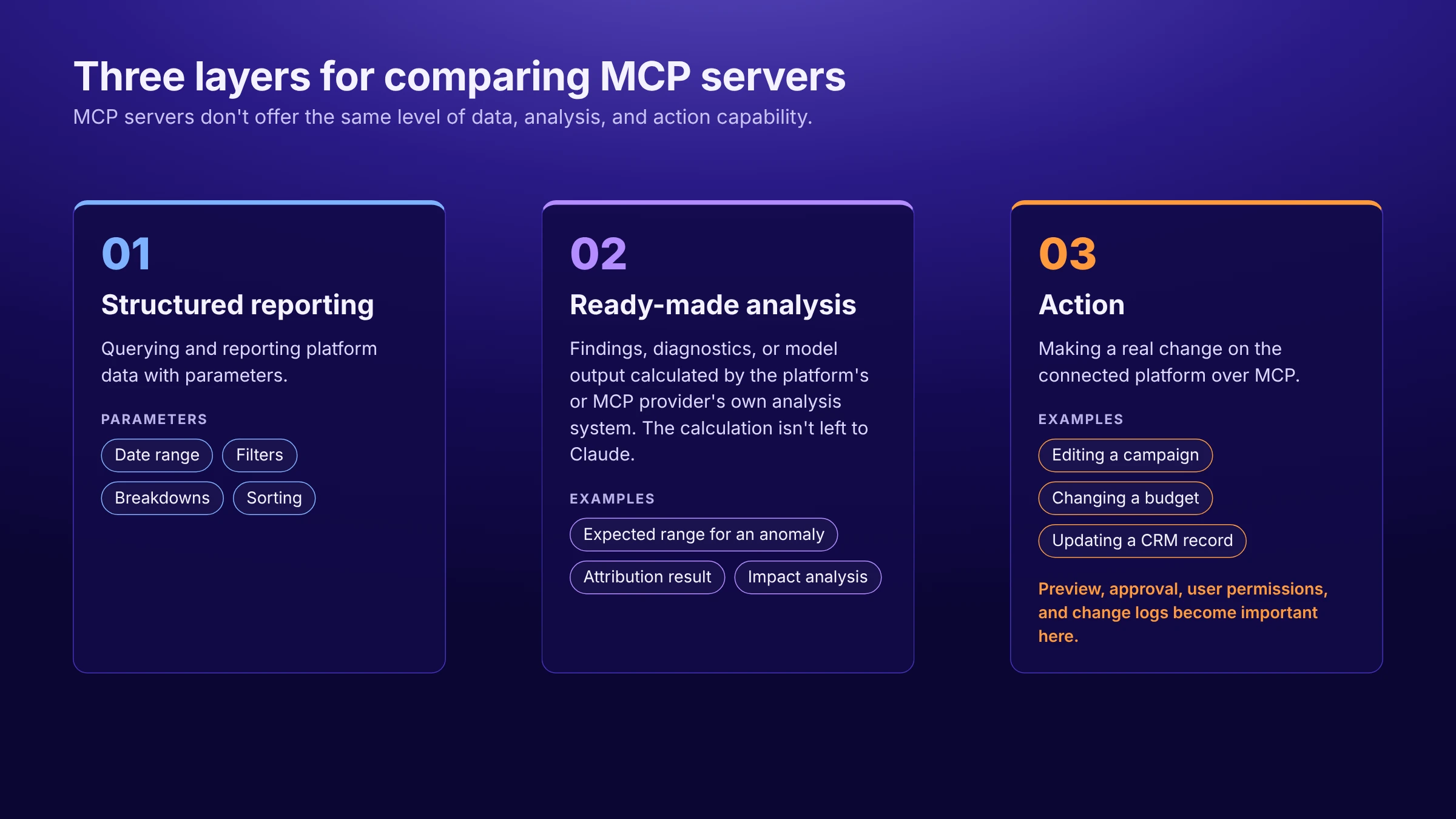
MCP servers don't offer the same level of data, analysis, and action capability. It's therefore more useful to run the comparison across three layers:
Structured reporting. Being able to query and report platform data with parameters such as date range, filters, breakdowns, or sorting.
Ready-made analysis. Passing findings, diagnostics, or model output calculated by the platform's or the MCP provider's own analysis system to Claude. An expected range for an anomaly, an attribution result, or an impact analysis are examples. The calculation isn't left to Claude.
Action. Being able to make a real change on the connected platform over MCP. Editing a campaign, changing a budget, or updating a CRM record fall into this scope. Where write capability exists, control mechanisms such as preview, approval, user permissions, and change logs also become important.
MCP | Structured reporting | Ready-made analysis | Write / action |
|---|---|---|---|
Orphex | Yes | Yes: detected findings, anomalies, pacing and forecasting, creative analysis, impact analysis | Yes: whether write permission is enabled depends on plan and workspace settings, and the scope depends on the platform; supported operations go through a preview and approval flow. |
Semrush | Yes | No separate ready-made analysis tool in the official tool list | No: read-only |
HubSpot | Yes | Partly: revenue attribution and email health diagnostics | Yes: CRM records and activities, email drafts, campaigns, and landing pages, website pages, and blog posts |
Google Ads | Yes | Not available as an MCP tool; the diagnostic logic is offered as a separate Agent Skill | No: read-only |
Meta Ads | Yes | Narrow scope: signal health insights | Yes: campaign, ad set, and ad operations, catalog and measurement studies |
Klaviyo | Yes: campaign and flow reports, metric aggregations, segment and form time series | No separate ready-made analysis tool in the official tool list | Yes: campaign creation and management, segment and list operations, template and coupon operations |
Shopify | Partly: offers catalog search, filtering, and structured queries; no performance reporting | No: the code validation and schema review capabilities in Dev MCP are not marketing analysis | Yes: cart creation and updates, checkout operations; scope varies by MCP surface |
Zapier | No: data can be pulled from connected apps, but there is no reporting layer of its own | No | Yes: actions such as searching, creating, and updating records in connected apps |
Slack | Limited: message, file, channel, and thread search and filtering exist; no marketing reporting | No: summarizing and interpretation are done by Claude | Yes, but limited to Slack: sending messages, creating channels and DMs, reactions and canvas operations |
Ahrefs | Yes: Site Explorer, keyword, SERP, Rank Tracker, Site Audit, Brand Radar, and batch analysis reports | A separate ready-made analysis layer was not verified: the existing Ahrefs report logic is accessed over MCP | Not verified: the documentation doesn't give a read/write distinction at tool level |
Google Ads is an important exception here. The Agent Skill that diagnoses account performance isn't a tool of the Google Ads MCP; it's an analysis layer added separately to AI assistants that support skills. That's why, in the table, Google Ads' ready-made analysis capability is shown not inside the MCP but as a separate Agent Skill.
To compare the use cases, write capabilities, control mechanisms, and setup requirements of MCP servers in more detail and independently of Claude, take a look at our MCP servers comparison for marketing teams.
What Should You Look At When Choosing an MCP for Claude?
When choosing an MCP for Claude, looking at three points is enough: which data it can access, whether it offers ready-made analysis or write capability, and how it connects to Claude. If there is write capability, you also need to evaluate control mechanisms such as preview, approval, and user permissions; on the connection side, you need to evaluate whether it runs remote or local, the plan required, and the account role required.
The need also directly shapes the choice. An MCP that suits SEO data may not be the same one you need to analyze multi-channel ad performance. So the best starting point is to decide first what job you want Claude to do.
How Do These MCP Solutions Connect to Claude?
The table below shows what each provider officially offers in terms of Claude support and connection method. Here, "official Claude support" and a statement that something "works with any client that supports the MCP standard" are not the same thing. The latter doesn't mean there's a setup path that has been specifically tested or documented for Claude.
MCP | Status with Claude | Connection approach | Important note |
|---|---|---|---|
Orphex | Offers official connection support for Claude | The remote server hosted by Orphex is added as a custom connector and you sign in with your Orphex account | On Team and Enterprise accounts, an Owner or Primary Owner adds the connection first; members then connect with their own accounts. Access depends on the user's Orphex account, permissions, and plan |
Semrush | Official setup documentation exists for Claude and Claude Code | You connect with OAuth to the remote server hosted by Semrush; in Claude, it is also available as a ready-made app in the connector directory | A suitable Semrush subscription is required; queries consume API units |
HubSpot | Doesn't publish a list of supported clients by name; provides a technical compatibility criterion | Remote server; there is a compatibility criterion for MCP clients that support OAuth and PKCE | An MCP auth app has to be created on the HubSpot side; the account's admin has to connect first |
Google Ads | A separate official support statement for Claude was not verified | The default setup is local; to use it through claude.ai it has to be hosted in a reachable remote environment | The official repository states only that the same configuration format applies for some clients, including Claude Code; this doesn't mean vendor-tested Claude support |
Meta Ads | General MCP compatibility is stated; no official source listing Claude by name as a supported client was verified | Remote server hosted by Meta; endpoint | Tool access is being rolled out to accounts gradually; the transport type was not verified in official sources |
Klaviyo | Official setup documentation exists for Claude and Claude Desktop | You connect with OAuth to the remote server hosted by Klaviyo | An Owner, Admin, or Manager role is required for the connection; connecting more than one account with a custom connector requires a paid Claude plan |
Shopify | An official connection path for Claude Code was verified only on the Dev MCP side | Dev MCP runs locally; an HTTP endpoint model is used on the Storefront, Catalog, and Checkout side | Consumer Claude client support isn't documented by name on the commerce surfaces; the connecting party is the application or agent being built |
Zapier | Official setup paths exist for Claude, Claude Code, and Claude Cowork | You connect to the remote endpoint hosted by Zapier with OAuth or a connection token | A separate server is required for each AI client; only Streamable HTTP is supported |
Slack | Claude.ai and Claude Code are in the official client list | You connect with confidential OAuth to the remote server hosted by Slack | A registered Slack app and workspace admin approval are required; Dynamic Client Registration isn't supported |
Ahrefs | Official setup guides exist for Claude Web, Desktop, mobile, and Claude Code | You connect to the remote server hosted by Ahrefs through an approval flow; the connection appears in the account as an MCP-scoped key | A Lite or higher paid plan is required; queries consume the monthly API unit quota |
Orphex MCP
Orphex MCP is the official MCP server that connects Orphex to AI assistants. Because it's hosted on Orphex's own infrastructure, you don't need to set up a separate MCP server or deal with self-hosting. It's added to Claude as a custom connector; the setup steps can vary depending on the AI assistant you use.
What sets Orphex MCP apart is that it brings data, analysis, and action together in the same flow: data from multiple platforms, ready-made analyses calculated in Orphex's own analysis layer, and then controlled action. This structure stands out especially for performance marketing teams working across channels. For teams focused on SEO and search visibility, Semrush may be a more direct solution.
Using Multiple Platforms in the Same Analysis with Orphex MCP
Because Orphex keeps data in a unified layer, a question like "Is Meta or Google performing better?" doesn't require manually merging two separate reports. Orphex MCP can use data from connected platforms together within the same analysis flow.
The scope depends on the workspace. The MCP can only reach data sources connected to that workspace and opened to access over MCP. In addition, Orphex's entire integration catalog isn't accessible over MCP, so the available data sources can vary by workspace.
This scope isn't limited to paid media. Alongside ad platforms, web analytics and search sources such as GA4 and Search Console, mobile measurement platforms such as Adjust and AppsFlyer, catalog and feed sources, and store and subscription revenue can be included in the same analysis. That way, ad performance can be evaluated together with web analytics, mobile measurement data, and realized revenue.
Read and write scope differ by platform. Write capabilities exist for 15 ad platforms: Google Ads, Meta, TikTok, Pinterest, LinkedIn, Apple Search Ads, Criteo, Snapchat, X (Twitter) Ads, Yandex Direct, Microsoft Advertising (Bing), RTB House, OpenAI Ads, Reddit Ads, and Taboola. Changes can also be made in 11 other integrations: GA4, Google Tag Manager, Adjust, AppsFlyer, Shopify, Google Sheets, Google Slides, BigQuery, Insider, Singular, and App Store Connect, for a total of 26 platforms.
Metric definitions can also differ across platforms. In Orphex's comparisons, differences that affect metrics, such as the attribution window, currency, or campaign objective, are taken into account and stated along with the result. Platforms can therefore be compared in the same analysis without assuming that metrics are defined the same way on every platform.
How Does Ready-Made Analysis Work in Orphex MCP?
This is where the difference between raw data access and ready-made analysis becomes clear in Orphex. Critical calculation and diagnosis aren't left to Claude interpreting raw data on its own; they happen in Orphex's analysis layer. Claude explains the results, puts them in context, and answers follow-up questions; but the anomaly threshold, the forecast, and the causal effect are calculated by Orphex, not by Claude.
The ready-made analyses that stand out for day-to-day marketing questions are these:
Detected problems and opportunities. Each finding is presented with a headline, business impact, severity, numerical impact, and an explanation. Surfacing the highest-impact findings also directly answers the question "What should I look at first?"
Anomalies. Which metric deviated in which segment is shown together with the observed value and the expected range. Because Orphex calculates the expected range, the question "Is this drop normal fluctuation or a real deviation?" isn't left to Claude's interpretation alone.
Pacing and forecasting. The answer to "At this rate, will we hit the target?" isn't based on a generic AI estimate but on a pacing and forecasting calculation made over the goal data defined in the account. The target, status to date, progress, pacing, forecast, and status are shown together. This requires a goal-tracking table defined in the account.
Creative analysis. Which creative attribute affects which metric and by how much, how it differs from the segment average, and how many creatives the result was calculated across are shown together. Attribute combinations that aren't visible when looked at individually can also be analyzed; for example, using a human face together with a price emphasis.
Impact analysis. For a question like "I increased the budget last month, did that really bring sales? What would have happened if I hadn't?", the campaigns measured, whether the effect is significant, the effect size, the confidence interval, before and after, and the counterfactual scenario are presented together. This analysis helps separate correlation from causal effect.
Alongside these, there's a weekly account health flow and ready-made analysis methods for the questions marketers ask most often: "Where should I shift budget?", "Meta or Google?", "Is creative performance declining?", "Are we hitting the target?", "Why did this sudden change happen?", "Is it worth spending on brand search?", and search term cleanup. If the account data doesn't meet a method's prerequisites, that method doesn't appear in the list.
Custom alerts can also be set up over MCP. Which metric will be tracked, at which threshold an alert will fire, which period it will be compared against, and how often it will be checked can all be defined; who the alert is sent to is configured in the Orphex interface.
On the attribution side the scope is narrower. Over MCP, attribution measurements coming from subscription revenue and mobile measurement sources can be used, along with reports where the attribution window is explicitly stated on platforms such as Meta and Pinterest. Orphex's own attribution model isn't offered as a separate capability in the MCP.
Competitor Tracking also exists in the Orphex product but isn't within MCP scope.
From Analysis to Action: The Control Flow in Orphex MCP
A decision that comes out of the analysis can be applied in the same session. Orphex MCP's scope isn't limited to reporting; changes can also be made in ad operations on supported platforms. Delivery can be paused and restarted at the campaign, ad set or ad group, and ad level; budgets, spending limits, and bids can be changed; new campaigns, ad sets, and ads can be created. Creative edits, including image and video uploads, are also supported.
Targeting and delivery schedules, keywords and negative keywords, audience and label management, and catalog and product set updates are also supported. On the Meta side there are some account-level operations such as A/B tests, pixels, custom conversions, and automation rules. As for actions outside advertising, supported key event operations in GA4 are one example.
The write feature isn't enabled by default for every user. First, the plan has to support this permission, and making changes has to be allowed in the workspace settings. Even when these conditions are met, write scope varies by platform; an operation supported on one platform may not be available on another. In addition, newly created assets are created paused. Approving the change therefore doesn't put the new asset live directly.
The control flow works like this:
Preview. The proposed change is shown with the before-and-after difference and a guardrail check. That way you can check whether the change complies with the defined rules before it's applied.
Approval. For the change shown in the preview to be applied, approval has to be given. The change isn't applied until approval is complete.
A second approval where required. If the workspace rules require additional human approval, a second approval is requested. If the rule requires the approval of two different people, the person who requested the change can't approve their own request.
Logging and partial rollback. Changes are logged along with the operation, platform, target, user, and source. An applied value can be reverted to its previous state, but newly created or deleted assets can't be rolled back the same way. Requests awaiting approval can be canceled, and prepared proposals can be rejected.
Automation rules on Meta are an exception to this flow. When an automation rule is created and activated, the preview and approval are given for the rule itself. Once the rule is active, it runs on its own schedule and doesn't ask for approval again each time it's triggered.
MCP access depends on the user's existing permissions in Orphex. The connection runs with the permissions of the person signing in; if a user can't access a workspace in Orphex, they can't access it over MCP either. In addition, all change permissions, a specific capability, or a specific connection can each be turned off separately.
This control structure doesn't mean other MCPs are uncontrolled. HubSpot limits access with user permissions; Google Ads MCP already works read-only. The difference with Orphex is that write capability is offered together with preview, approval, change logging, and, in supported cases, partial rollback mechanisms.
How Does Orphex MCP Connect to Claude?
Orphex MCP is added to Claude as a custom connector. Because the server runs on Orphex's own infrastructure, you don't need to set up a separate MCP server or do any self-hosting. On Claude's Free, Pro, and Max plans you can connect by adding the connection address and signing in with your Orphex account.
The steps for adding the custom connector are as follows:
Open the
Customize > Connectorspage in Claude.Select "+" and then "Add custom connector".
Enter the Orphex MCP server address:
https://api.orphex.co/api/interaction-gateway/v1/mcpAdd the connector with "Add".
Sign in with your Orphex account from the connector card and approve the permissions.
On Team and Enterprise accounts, an Owner or Primary Owner adds the connection first from the Organization settings > Connectors section. Team members then connect from their own accounts by clicking Connect.
Sign-in happens through Orphex's standard sign-in screen. You don't need to create a separate API key or personal token. Access depends on the connecting application being among the clients supported by Orphex, and on the user's Orphex account, plan, and existing permissions. Whatever workspaces and operations a user can access in Orphex, they work within those same permission boundaries over MCP.
There's no separate charge for MCP. However, whether permission to make changes in ad accounts is enabled depends on your plan and your workspace settings. Some analysis operations can consume AI credits. There's no access restriction specific to Turkey.
It's important to separate two different approval layers here. Claude's tool approval screens are the control on the client side, while Orphex's preview and approval flow is the control on the server side. Even if the relevant tool call has been permitted on the Claude side, a budget change, for example, isn't applied without going through the preview and approval process on the Orphex side.
Which MCP Should You Choose in Claude?
A single MCP doesn't have to meet every marketing need. Because Claude can work with more than one MCP connection, teams can use different servers together for different needs. One MCP for paid media, another for search, and a different connection for CRM.
When using more than one MCP, telling Claude explicitly which connection should answer which question reduces confusion. This distinction is particularly useful where tools with similar functions exist.
Need | Standout solution |
|---|---|
Comparing connected ad channels such as Meta, Google, TikTok, Pinterest, LinkedIn, and Apple Ads in the same question, and assessing which channel or campaign budget could be shifted to | Orphex |
Reading anomaly, pacing and forecasting, creative, and impact analyses calculated in Orphex's own analysis layer | Orphex |
Putting a change through preview and approval when moving from analysis to action | Orphex |
Evaluating ad data together with web analytics, mobile measurement, revenue, and catalog context in the same question | Orphex |
Turning campaigns and ads on and off across multiple ad platforms, changing budgets and bids, and creating new campaigns, ads, and creatives | Orphex (scope varies by platform) |
Reaching keyword, organic competitor, and backlink data, and market data on a suitable Trends subscription | Semrush |
Reading Rank Tracking and Site Audit findings from Semrush projects | Semrush |
Reporting SEO data in detail, running multi-domain analysis, and reaching Site Audit, backlink, Rank Tracker, and Brand Radar data | Ahrefs |
Querying the pipeline, examining the relationship between campaigns and revenue, and updating CRM records | HubSpot |
Examining marketing email performance and email health diagnostics, and creating email drafts and A/B variants | HubSpot |
Reporting flow and campaign performance, and working on segment and list operations and email templates | Klaviyo |
Reporting Google Ads data read-only over MCP | Google Ads |
Setting up campaigns in Meta, resolving catalog issues, and running A/B tests and conversion lift studies | Meta Ads |
Building agentic commerce flows covering product discovery, cart, and checkout steps with the different Shopify commerce MCP surfaces | Shopify |
Taking action across multiple connected apps within the same flow | Zapier |
Finding briefs, past decisions, messages, and threads in Slack and taking action inside Slack where needed | Slack |
Connecting a hosted SEO MCP with OAuth without needing a developer token, cloud project, or self-hosting | Semrush |
When deciding, first write down the three questions you want to answer. Then determine which platforms' data and which layers those questions need. Those layers can be data access, ready-made analysis, and action.
Finally, check the connection path on the Claude side. Whether the connection runs remote or local, whether the provider offers an official setup path for Claude, and whether admin setup is required on a team account can all affect the choice. The provider's own plan, role, and usage quota requirements also need to be checked separately.
Conclusion
There is no single "best MCP" in Claude. The right choice depends on what job you expect Claude to do. Semrush or Ahrefs for SEO research, HubSpot for CRM and pipeline, Klaviyo for lifecycle marketing, Zapier for cross-app action, Slack for team context, Shopify's commerce MCP surfaces for agentic commerce, Google Ads MCP for Google Ads reporting, and Meta Ads MCP for Meta ad, catalog, and measurement operations each answer different needs.
That's why being able to access data or specific platform functions isn't on its own a sufficient comparison criterion. The real difference emerges in which data and operations are opened up, who calculates the ready-made analysis, whether write capability exists, and how actions are controlled.
For multi-channel performance marketing, Orphex MCP brings these layers together in the same flow. It can use connected sources supported over MCP in the same analysis, pass output calculated in Orphex's own analysis layer to Claude, and carry out supported actions with preview and approval mechanisms. The write scope varies by platform, and Competitor Tracking isn't within MCP scope.
On the Claude side, three points need to be evaluated separately. Because the claude.ai custom connector connection runs remote, the MCP server has to be reachable over the public internet. For servers on a private network, allowlisting Anthropic's IP addresses is supported as a separate connection path. Claude's general plan support and the MCP provider's own plan, role, and usage conditions aren't the same thing. Finally, Claude's tool permissions and the MCP server's own approval and control mechanisms are two separate layers. On a connection with write capability, both need to be evaluated separately.
In the end, the right question isn't "which one is best?" but "which decision or job do I want to speed up?"
Frequently Asked Questions
What Is Claude MCP?
Claude MCP isn't a separate product name; it refers to Claude connecting to the data and functions of external systems over the MCP (Model Context Protocol) standard. Once the connection is established, Claude can access data in systems such as advertising, analytics, CRM, or SEO within the permissions granted, and can make changes in those systems if the MCP server supports it. Remote MCP connections that the user adds to Claude are managed as custom connectors.
How Do You Add an MCP Server to Claude?
On the Free, Pro, and Max plans, you select "+" and then "Add custom connector" in the Customize > Connectors section. The remote MCP server URL is entered. If required, the OAuth Client ID and Client Secret are added under Advanced settings, and it's completed with Add. You then authenticate with the relevant account from the connector card.
On Team and Enterprise accounts, an Owner or Primary Owner first adds the connector from the Organization settings > Connectors section via the Add > Custom > Web path. Team members then connect from their own accounts with Connect.
Do You Need Developer Mode for Claude MCP?
No. Developer Mode isn't required for custom connector setup on claude.ai.
The Extension Developer section in Claude Desktop is a different mechanism. This section, found under Settings > Extensions > Advanced settings, is used to install a custom desktop extension and isn't a prerequisite for remote custom connector setup.
Does the Claude Free Plan Support MCP?
Yes. Custom connectors can be used on the Claude Free plan, but there is a limit of 1 custom connector.
Here you need to separate Claude's custom connector support from the requirements of the MCP provider you connect to. A provider may require a paid Claude plan, a specific subscription in its own product, or a specific account role for its own connection.
Klaviyo, for example, states that a paid Claude plan is required when a custom connector is used to connect more than one account to the same Claude environment. Ahrefs, meanwhile, requires a Lite or higher Ahrefs plan for MCP usage.
Is MCP Setup the Same in Claude Desktop and claude.ai?
Not exactly the same. Remote custom connectors can be used on claude.ai, Claude Desktop, Cowork, and the mobile app. Claude Desktop additionally has a separate mechanism for running local MCP servers.
The important distinction is this: when Claude Desktop connects to a remote custom connector, the connection originates not from your computer but from Anthropic's cloud infrastructure. The local MCP mechanism in Claude Desktop is separate from that and runs in the local environment.
Can Claude Run a Local MCP Server?
Yes, but native local MCP support is limited to Claude Desktop and Claude Code.
In Claude Desktop, local MCP servers can be used through Desktop Extensions or claude_desktop_config.json. In Claude Code, stdio-based local servers can be added with claude mcp add.
claude.ai, Cowork, and the mobile app can't run native local MCP. That's why you can't connect directly through a claude.ai custom connector to an MCP server running on localhost on your own computer.
How Do You Set Up MCP in Claude Code?
For a remote MCP server the command claude mcp add --transport http <SERVER_NAME> <MCP_URL> is used, and for a local server claude mcp add <SERVER_NAME> -- <COMMAND>.
The connection can be checked with claude mcp list. If authentication is required, the relevant server is selected from the /mcp command within the session and the Authenticate step is completed.
Where the configuration is saved depends on the scope selected. The default local scope and the user-wide user scope are kept in ~/.claude.json, while project scope uses the .mcp.json file in the project root.
Does Claude Support MCP OAuth?
Yes. OAuth is supported for Claude MCP connections. The supported mechanisms include Dynamic Client Registration, token refresh, and manual use of a Client ID and Client Secret for servers that don't support DCR.
Authentication options can vary depending on the Claude surface used. On the claude.ai custom connector side, a Request headers feature is supported for sending credentials such as a static API key or bearer token. In Claude Code, static headers can be added with the --header option.
Claude supporting these authentication methods doesn't mean every MCP server will use all of them. The MCP server you connect to determines the valid method.
Can Multiple MCPs Be Connected to Claude?
Yes. Multiple custom connectors can be used in Claude, and connectors can be enabled individually per chat.
Plan requirements also need to be taken into account. The Free plan has a limit of 1 custom connector. On Team and Enterprise accounts, an Owner or Primary Owner adds the connectors first, and team members then connect with their own accounts.
When using more than one connection, it's useful to tell Claude explicitly which source you want it to use. Especially where connectors with similar functions exist, this makes it easier to direct it to the right data source and tool set.
Can Ad Budgets Be Changed Through Claude MCP?
It depends on the MCP you connect. Google's official Google Ads MCP server works read-only. It can't change bids, pause campaigns, or create new assets.
Meta Ads MCP, on the other hand, offers write capabilities such as creating and editing campaigns, ad sets, and ads. However, because budget changes weren't verified as a separate MCP capability in the accessible official sources, we don't attribute that directly to Meta Ads MCP.
In Orphex MCP, budget, spending limit, and bid changes can be made on supported ad platforms. The change is previewed first, then approved, and once applied it goes into the change log. If the workspace rules require it, a second human approval can also be requested.
Before connecting an MCP with write capability, it's important to check which operations it supports, whether the scope varies by platform, and which permission, approval, and logging mechanisms apply to those operations.
How Do MCP Tools Work During Claude Research?
While Claude Research is running, it can call connector tools automatically without additional user approval. For this reason, Anthropic recommends that tools able to write be managed carefully in Research usage and turned off before Research starts if necessary.
If you're using an MCP with write permission, setting the relevant tools to Blocked in the connector settings or turning the connector off for that chat is worth considering. On Team and Enterprise accounts, Owners can additionally disable some interactive tool calls organization-wide through Organization settings > Connectors.
How Does Orphex MCP Connect to Claude?
Orphex MCP is added to Claude as a remote custom connector. On the Free, Pro, and Max plans, "+" > "Add custom connector" is selected in the Customize > Connectors section, the Orphex MCP server address is added, and you then sign in with your Orphex account from the connector card.
On Team and Enterprise accounts, an Owner or Primary Owner first adds the connector from the Organization settings > Connectors section. Team members then connect with their own accounts by clicking Connect.
Because the server is hosted by Orphex, you don't need to set up a separate MCP server or do any self-hosting. No separate API key or personal token is created either. The scope you can use varies depending on your Orphex account, your plan, your workspace permissions, and the connected sources supported over MCP.
Can These MCP Servers Be Used from Turkey?
No access restriction specific to Turkey was verified for the MCP servers we reviewed in this research. However, this doesn't mean every provider explicitly guarantees global access.
You also need to separate the MCP server's own access conditions from the plan, account, or region conditions of the AI assistant you use. Because tool access on the Meta Ads MCP side is being rolled out to accounts gradually, it's worth checking which capabilities are available in your account before setup.
On the Orphex side there is no access restriction specific to Turkey. The available scope varies depending on the AI assistant you connect, your Orphex account, your plan, your workspace permissions, and the connected sources supported over MCP.
Does Using MCP Require Extra Cost?
There's no single pricing model. While the MCP server itself may be free, the provider's subscription, usage quota, or the cost of hosting the server can come into play separately.
For Semrush, a suitable paid subscription is required and queries consume API units. Google Ads MCP is open source and free. However, to use it through claude.ai you may need to run the server in a reachable remote environment, and the developer token required for the Google Ads API plus Google Cloud preparation are needed.
In Zapier, successful tool uses consume two tasks from the task quota on your plan. Ahrefs MCP requires a Lite or higher paid plan, and queries are drawn from the monthly API unit quota.
Klaviyo's official documentation doesn't state a separate Klaviyo charge or a separate MCP plan for MCP. On the Slack side, the plan level required for MCP and separate pricing weren't verified in the accessible official sources. Meta Ads MCP's pricing also couldn't be verified.
At Orphex there's no separate charge for MCP. Whether permission to make changes in ad accounts is enabled depends on your plan and your workspace settings. Some analysis operations, meanwhile, can consume AI credits.
How Do You Get Started with Orphex MCP?
Orphex MCP can be added as a custom connector to supported AI assistants. The features you can use vary depending on your Orphex account, your plan, your workspace permissions, the AI assistant you use, and the connected sources supported over MCP.
To assess your own use case, identify the three questions your team wants to answer and get in touch with the Orphex team through the Orphex MCP page. →
