Marketing teams that want to connect Microsoft 365 Copilot to their advertising, analytics, CRM, and SEO systems will sooner or later run into MCP (Model Context Protocol). Once an MCP server is connected, Copilot can access the data it has been authorized to see and answer your questions based on it; if the server and the Microsoft-side permissions support write operations, it can also make changes in the connected platforms.
However, not every MCP server offers the same scope: one solution only provides access to structured data, another can produce findings in its own analysis layer, and another allows a real action to be taken in the connected system. Microsoft 365 Copilot works differently, too: a third-party MCP server is not added directly to the main chat screen. Instead, it joins the ecosystem through other routes such as Copilot Studio, a declarative agent, or a custom federated connector.
In this guide, we compare 10 official MCP solutions that stand out for marketing teams in terms of data access, ready-made analysis, write capability, and Microsoft 365 Copilot compatibility. Then we walk through how MCP actually works in Microsoft 365 Copilot, the Copilot Studio setup, and plan and permission differences, step by step.
Which MCP Stands Out for Which Use Case in Microsoft 365 Copilot?
Orphex MCP stands out for multi-channel ad performance, Semrush and Ahrefs for SEO and search data, HubSpot for CRM, and Klaviyo for lifecycle marketing.
The Google Ads MCP focuses on reporting, and the Meta Ads MCP on ad and catalog operations. Zapier supports taking action across apps, Slack gives access to team context, and Shopify supports commerce and development workflows.
Orphex MCP: Multi-channel performance marketing.
Compares connected ad platforms in the same analysis; it can also include web analytics, mobile measurement, and connected revenue sources.
Anomaly, trend and forecast, creative analysis, and impact analysis are calculated in Orphex's own analysis layer.
If write access is enabled in the plan and workspace settings, budget, campaign, and creative changes can be made on supported platforms; changes go through a preview and approval flow.
Orphex lists Microsoft 365 Copilot among its supported AI assistants; setup details may vary depending on workspace conditions.
Semrush MCP: SEO, content, and market data.
Gives access to keyword, organic competitor, backlink, and traffic data.
The server is read-only; it does not make any changes in the Semrush account.
A suitable Semrush subscription is required, and every query consumes API units.
Ahrefs MCP: Search visibility and structured SEO reporting.
Site Explorer, keywords, SERP, Rank Tracker, Site Audit, and batch analysis reports can be accessed from within the chat.
It runs on a remote server hosted by Ahrefs; a Lite or higher paid plan is required.
A separate, named setup guide is published for Microsoft Copilot Studio.
HubSpot MCP: CRM, campaigns, and marketing email.
Pipeline data can be queried, campaign performance and revenue attribution can be reviewed, and CRM records can be updated.
Revenue attribution and email health diagnostics include outputs calculated by HubSpot itself.
HubSpot has a separate, Microsoft Graph-based "HubSpot Agent for Copilot" product; it is a different mechanism from the MCP server.
Klaviyo MCP: Email and SMS lifecycle reporting.
Campaign and flow performance reports, metric aggregations, segment data, and form time series can be queried.
It has write capability for campaigns, segments, templates, and coupons.
Campaign sending is also supported (a send_campaign tool is available); for irreversible actions such as sending, the approval step should stay on.
Google Ads MCP: Search ads reporting.
Google Ads accounts and campaign data can be queried in natural language through GAQL queries.
The server is read-only; it can be hosted in your own environment (for example on Cloud Run) over stdio or Streamable HTTP. Google's hosted endpoint is available only to allowlisted pilot participants.
The Agent Skill that diagnoses account performance is not part of the MCP server; it is offered as a separate layer.
Meta Ads MCP: Meta ads, catalog, and measurement operations.
Reporting, campaign and ad operations, catalog management, signal diagnostics, A/B tests, and measurement work are available from the same MCP surface.
It is hosted by Meta and runs remotely; tool access is being opened to ad accounts gradually.
In agency scenarios, where ad accounts of other businesses are managed, Meta's official App Review process must be completed.
Shopify MCP: Commerce flows and development.
Shopify does not have a single MCP server. Alongside the Dev MCP, there are separate official surfaces for Storefront, Global Catalog, Storefront Catalog, Checkout, Cart, Order, and Customer Account.
The commerce-side surfaces cover product discovery, cart, and checkout operations; marketing performance reporting for merchants is not offered.
Zapier MCP: Taking action across multiple apps.
Zapier MCP does not provide its own data; instead, it enables actions such as searching, creating, and updating records in connected apps.
There is no separate reporting or analysis layer.
A separate, named setup page and blog content are published for Microsoft Copilot Studio.
Slack MCP: Team context and decision history.
Campaign discussions, briefs, and past decisions can be searched and read in Slack.
Actions inside Slack such as sending messages, creating channels, adding reactions, and working with canvases are supported.
Setup requires a registered Slack app and admin approval; Dynamic Client Registration is not supported.
What Is MCP and Why Do Marketing Teams Use It?
MCP is an open standard that lets an AI assistant access a platform's data and tools in an authorized way. This way, marketing teams can query the connected source directly and ask follow-up questions on the same data, instead of exporting data and combining it by hand.
A feature being available in a platform's own interface does not mean it is also available through MCP: each platform exposes only certain data and capabilities to MCP. In addition, whether an MCP is read-only or has write access directly changes how it is used. A read-only MCP can read data but cannot change it, while an MCP with write capability can take action in supported areas and therefore requires more control.
To compare MCP servers independently of the client, you can check out our comparison of MCP servers for marketing teams.
What Connection Paths Exist for MCP in Microsoft 365 Copilot?
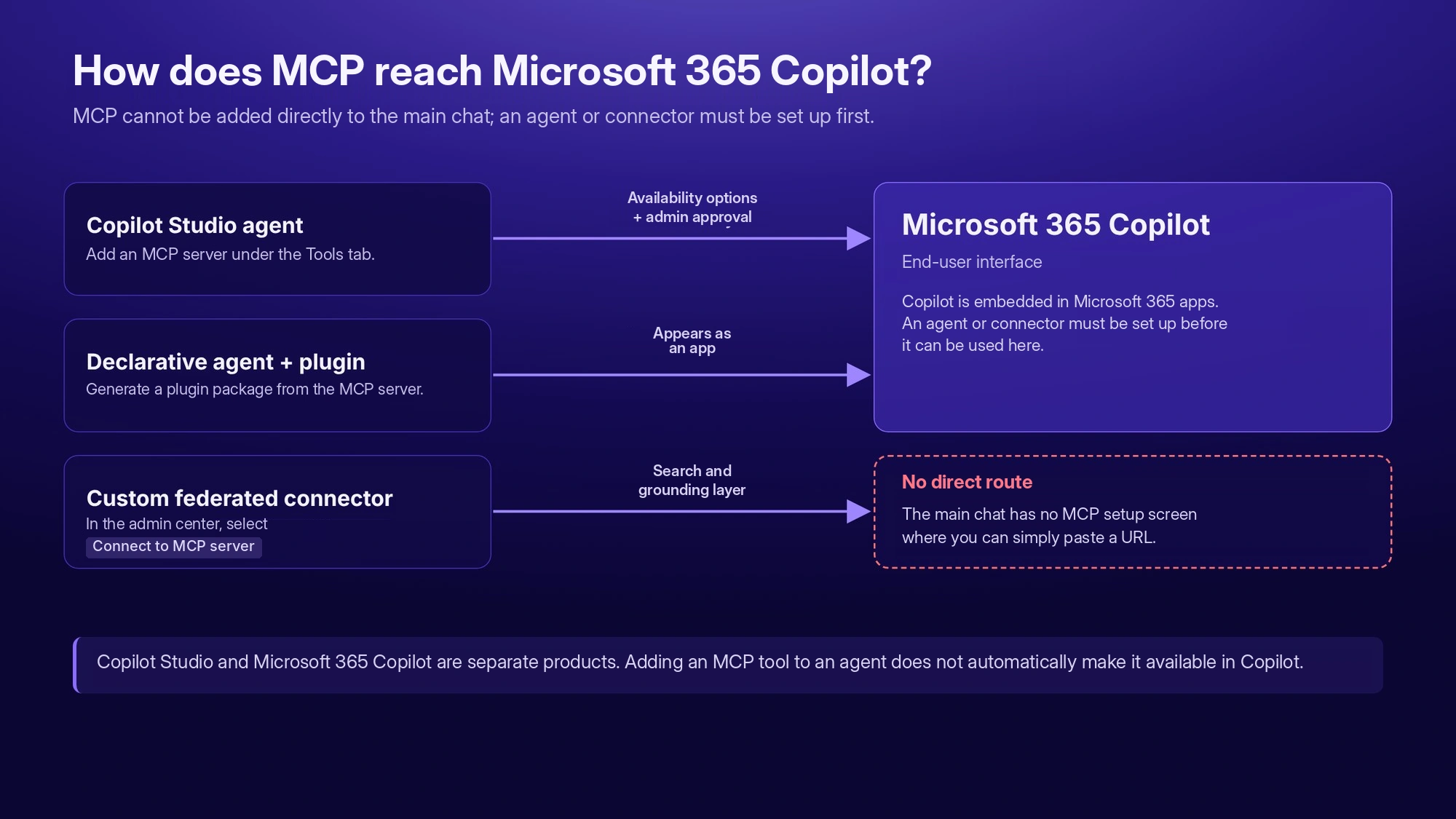
In the Microsoft 365 Copilot ecosystem, third-party MCP use happens through different Microsoft agent and connector surfaces. Today there are three separate official paths:
Copilot Studio (custom engine agent): adding an existing MCP server to the agent's Tools tab.
Declarative agent + MCP plugin (with Microsoft 365 Agents Toolkit): generating a plugin package from the MCP server and adding it to a declarative agent.
Custom federated connector: registering the MCP server through the Microsoft 365 admin center and Teams Developer Portal as a search/grounding source; write tools ask for user approval by default.
These three paths are not the same setup experience and cannot be merged into a single "Microsoft 365 Copilot MCP setup."
Path | What for? | Who sets it up? | Read / write |
|---|---|---|---|
Copilot Studio | Building an agent that can take action | Marketer/maker; separate admin approval for org-wide publishing | Read and write (if the server allows it) |
Declarative agent + MCP plugin | Presenting the agent in Microsoft 365 Copilot like an "app" | Developer (Agents Toolkit) | Read and write, with separate user approval for each write operation |
Custom federated connector | Adding a search/grounding source | Admin (Global or AI Administrator) | Read and write (write tools ask for approval by default) |
For marketers, the most practical starting point is Copilot Studio.
Can an MCP Server Be Added Directly to Microsoft 365 Copilot?
No. The main chat interface does not offer an MCP setup screen of its own. Instead, an agent or connector is first set up through one of the three paths above, and then that agent is made available in Microsoft 365 Copilot. The phrase "Microsoft 365 Copilot supports MCP" therefore does not mean "you paste a URL into the main chat"; ecosystem support and main-interface support need to be kept separate.
How Do You Add an MCP Server to Copilot Studio?
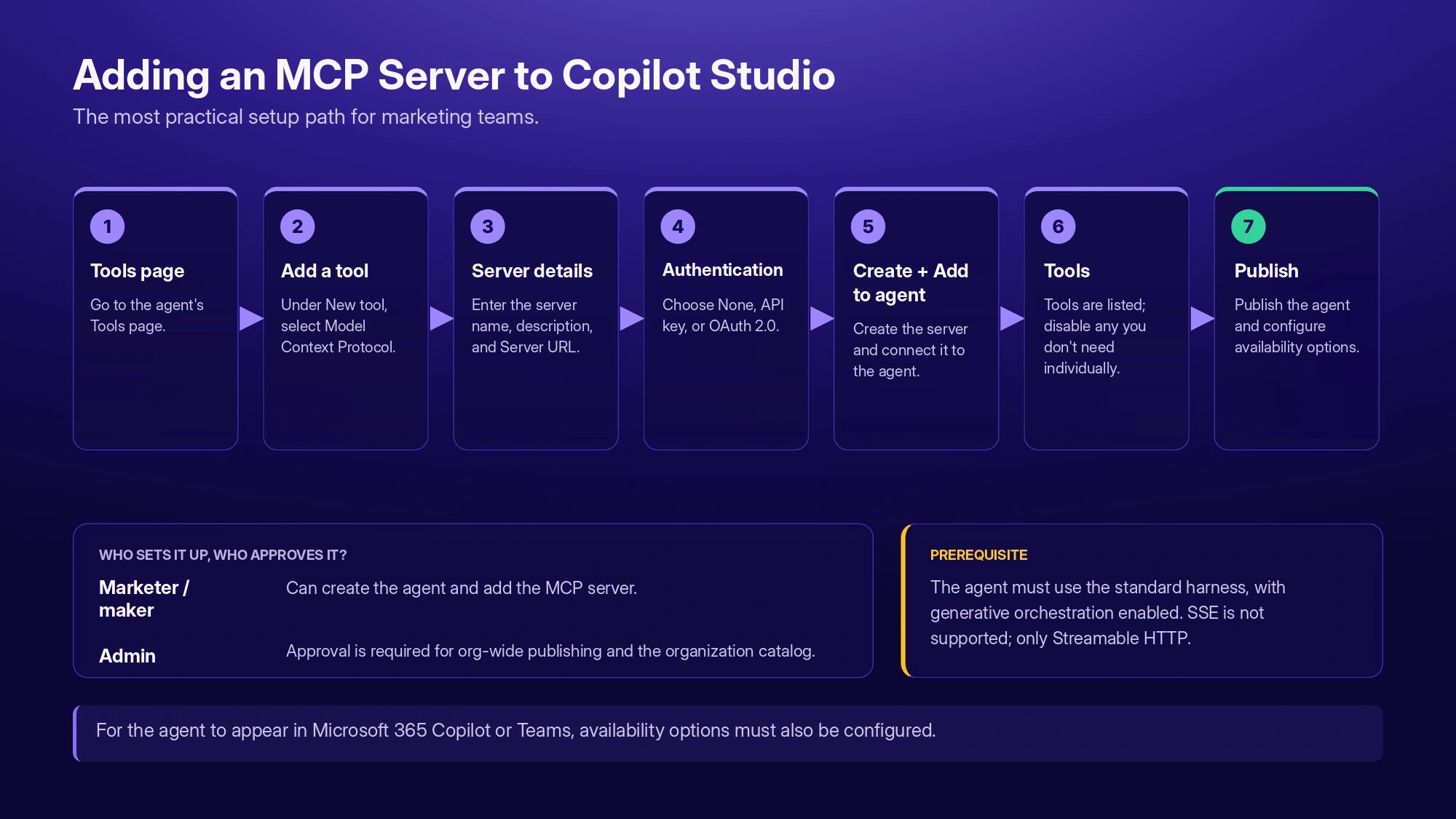
This is the most realistic setup path for marketing teams. Prerequisite: the agent must run on the standard harness and generative orchestration must be turned on.
In Copilot Studio, go to the agent's Tools page.
Select Add a tool > New tool > Model Context Protocol.
Fill in the Server name, Server description, and Server URL fields.
Choose the authentication type: None, API key (Header or Query), or OAuth 2.0 (Dynamic discovery, Dynamic, or Manual).
If OAuth 2.0 is selected, Copilot Studio generates a callback URL; this URL must be registered with the identity provider.
Add the server with Create, then connect it to the agent with Add to agent.
The server's tools are listed in the agent's Tools tab; all are on by default, and they can be turned off tool by tool if needed.
Publish the agent. For it to appear in Microsoft 365 Copilot or Teams, availability options must also be set, and for org-wide use it must go through admin approval.
These steps are a general setup flow that applies to any third-party remote MCP server; it is not specific to a particular vendor.
Are Microsoft 365 Copilot and Copilot Studio the Same Thing?
No. Microsoft 365 Copilot is the end-user surface embedded in Microsoft 365 apps, while Copilot Studio is a separate platform used to build agents. Adding an MCP tool to an agent in Copilot Studio does not automatically move that agent into Microsoft 365 Copilot: availability options must be set for the agent to appear there, and publishing to the organization catalog requires admin approval.
When Should You Use a Declarative Agent + MCP Plugin?
This path is preferred when you want to present the agent as a persistent app inside Microsoft 365 Copilot. It is official and GA, but since it requires Microsoft 365 Agents Toolkit, a plugin manifest, and, where needed, authentication configuration, completing it without developer support is not realistic. A plugin generated from the MCP server is packaged into a declarative agent, and that agent appears in Microsoft 365 Copilot like an app.
When Should You Use a Custom Federated Connector?
This path is used when you want to add the MCP server directly to Microsoft 365 Copilot's search and grounding layer as a source, without building an agent. According to Microsoft, write, update, and delete tools are also supported on this path; they ask for user approval by default, but the Researcher agent does not support such operations. Setup is done in the admin center through Copilot > Connectors > Gallery > Create a new connector > Connect to MCP server, and it is entirely admin-gated: it requires the Global Administrator or AI Administrator role, an Entra admin role, and Teams Developer Portal access; it is not a path a marketer can set up alone.
An Extra Approval Layer in Enterprise Environments: Microsoft Agent 365 and BYO MCP
In large or regulated organizations, an MCP server connected to Copilot Studio can optionally also go through Microsoft Agent 365's "Bring Your Own MCP" (BYO MCP) flow. Microsoft Agent 365 is an enterprise governance layer for agents that has been generally available since May 1, 2026 (in the Commercial segment, licensed per user), and BYO MCP is a sub-feature of this layer that is still in preview; during the preview, Microsoft 365 declarative agents are not supported. BYO MCP lets a developer register an MCP server and have it approved by an admin; once approved, it can be monitored centrally and blocked if needed. This is not a fourth setup path replacing the three above; it is an optional enterprise approval layer on top of the Copilot Studio path. The practical meaning for marketing teams working in a large organization is this: IT may have made the use of an MCP server in Copilot Studio subject to this separate approval.
What Can Marketers Actually Do with Microsoft 365 Copilot and MCP?
In the examples below the flow is the same: you write the request, the agent calls the relevant tool of the connected MCP server, the server provides the data, ready-made analysis, or action, and the agent relays the result to you. The data and analysis here are not Microsoft 365 Copilot's own capability; they come from the scope offered by the MCP server you connect.
Seeing account health (Orphex)
"Which campaigns have been wasting money in the last 28 days? Rank them against my own account's average."
Campaigns are evaluated against the account's own average; the comparison does not rely on an external benchmark.
Making a creative decision (Orphex)
"Which creative feature is lowering cost on Meta, video or image?"
Which creative feature affects which metric and by how much, how it differs from the average, and how many creatives it was measured on all come together.
Asking about causality (Orphex)
"I increased the budget last month. Did it really bring sales, and what would have happened if I hadn't?"
Impact analysis shows the measured campaigns, whether the effect is significant, the effect size, and the confidence interval, together with the counterfactual scenario.
Moving from analysis to action (Orphex)
"Reduce this ad set's budget by 20 percent."
The agent first previews what will happen, you approve, and then the change is applied and recorded.
SEO and search visibility (Semrush, Ahrefs)
"Compare the backlink profiles of these three domains by referring domain count and anchor distribution."
Semrush brings keyword, backlink, competitor, and traffic data into the chat; Ahrefs offers batch analysis and groupable reporting. With both providers, queries consume API units.
Pipeline and campaign-revenue relationship (HubSpot)
"Summarize the deals at a specific stage in the pipeline."
Pipeline and campaign data can be queried, revenue attribution and email health diagnostics can be read over the same connection, and CRM records can also be updated.
Flow and campaign reporting (Klaviyo)
"Pull the last 90 days of flow performance and show the best and worst."
The MCP provides the report; interpretation happens on the agent side.
Search ads reporting (Google Ads)
"Show the performance of the top-spending campaigns of the last 7 days by device category."
Because the Google Ads MCP is read-only, use stays on the reporting and data query side.
Catalog and signal health (Meta)
"Find the products in my catalog that can't be shown in ads and any feed issues."
Catalog issues and signal health come as outputs calculated in Meta's own system.
Finding past decisions (Slack)
"What did we decide about pricing last month?"
Access is limited to the content the connecting user can already see in Slack; summarization and interpretation happen on the agent side.
Chaining apps (Zapier)
"Create a task from this customer email and notify the owner."
Zapier enables actions in connected apps; third-party API keys are not passed to the agent, and credentials stay on the Zapier side.
Commerce and development side (Shopify)
Shopify's commerce-side MCP surfaces can be used for product discovery, cart, and checkout flows; this is not marketing performance reporting.
How Do MCP Servers Differ in Data, Ready-Made Analysis, and Action?
When comparing MCP servers, we look at three things. Structured reporting: being able to query data with parameters such as date range, filters, or sorting. Ready-made analysis: findings, diagnostics, or model outputs being calculated directly by the platform's or MCP provider's own system. Action: being able to make a real change on the connected platform through MCP.
MCP | Structured reporting | Ready-made analysis | Write / action |
|---|---|---|---|
Orphex | Core capability | Anomaly, trend/forecast, creative analysis, and impact analysis are calculated in Orphex's own layer | If the plan and workspace allow; goes through preview and approval |
Semrush | Core capability | No separate ready-made analysis layer | None, read-only |
Ahrefs | Core capability | The product's existing reporting logic is carried over; no separate analysis layer | Could not be verified (write status of the management group is unclear) |
HubSpot | CRM, pipeline, campaign data | Has calculated outputs such as revenue attribution and email health diagnostics | CRM records and engagements can be written; campaign, landing page, and blog post side is read-only; custom objects can be read |
Klaviyo | Campaign, flow, segment data | No separate ready-made analysis tool | Campaign (including sending), segment, template, and coupon operations |
Google Ads | Core capability | None; diagnostic logic is in a separate Agent Skill layer | None, read-only |
Meta Ads | Ad and measurement data | Has a limited diagnostic layer for signal and dataset health | Campaign, ad set, catalog, and measurement operations |
Shopify | Varies by surface; no marketing performance reporting | Code validation in the Dev MCP is outside the scope of marketing analysis | Cart and checkout operations; scope varies by the surface used |
Zapier | No reporting layer of its own | None | Search, record creation, and updates in connected apps |
Slack | Message/file/thread search; not a marketing reporting layer | None, summarization is done on the agent side | Message, channel, reaction, and canvas operations; scope limited to Slack |
Google Ads creates an important exception in this table: the Agent Skill that diagnoses account performance is not part of the Google Ads MCP; it is offered in a separate layer. Seeing where the ready-made analysis is calculated is a necessary step for a correct MCP comparison.
What Should You Look at When Choosing an MCP for Microsoft 365 Copilot?
Which marketing job you want to speed up.
Whether the MCP offers structured reporting only or ready-made analysis as well.
Whether it is read-only or can also take action.
Whether the MCP server needs to be remote (all three paths expect remote).
Which Microsoft surface is needed (Copilot Studio, declarative agent, custom federated connector).
Whether setup depends on admin approval.
Whether the vendor officially supports Microsoft 365 Copilot or Copilot Studio by name.
An MCP server supporting the standard does not mean it offers a verified setup path for Microsoft 365 Copilot: Microsoft's support and the provider's own terms need to be checked separately.
How Do These MCP Solutions Connect to Microsoft 365 Copilot?
Microsoft 365 Copilot and Microsoft Copilot Studio are separate products and their support statuses are not the same; the table below evaluates the two in separate columns.
MCP | Microsoft 365 Copilot | Copilot Studio | Key note |
|---|---|---|---|
Orphex | Named official support | Official support not verified | Orphex names Microsoft 365 Copilot in its own official client list; Copilot Studio is not named separately. |
Semrush | Technical compatibility only | Technical compatibility only | Microsoft's name does not appear in official sources; the remote/OAuth architecture may be compatible in theory. |
HubSpot | Generic MCP compatibility | Generic MCP compatibility | Should not be confused with the separate, non-MCP "HubSpot Agent for Copilot" (Graph-based) product. |
Google Ads | Official support not verified | Official support not verified | The server can be self-hosted and Google's hosted endpoint is pilot-only; Microsoft's name is not in the official source. |
Meta Ads | Generic MCP compatibility | Generic MCP compatibility | There is only generic "MCP-compatible agent" language; no name-based support. |
Klaviyo | Technical compatibility only | Technical compatibility only | The remote OAuth architecture may be compatible in theory; there is no named support. |
Shopify | Official support not verified | Official support not verified | No official name on any commerce surface; the generic "Microsoft Copilot" wording in a separate commercial announcement does not count as MCP support. |
Zapier | Generic MCP compatibility | Named official support | There is a separate, official setup page and blog for Copilot Studio; none for Microsoft 365 Copilot. |
Slack | Technical compatibility only | Technical compatibility only | Slack's registered-app and admin approval requirements make compatibility narrower than in the typical scenario. |
Ahrefs | Official support not verified | Named official support | There is a separate setup page specific to Copilot Studio; no name for Microsoft 365 Copilot. |
Zapier and Ahrefs are particularly notable in this table: both offer named, official support for Copilot Studio, but that support is not generalized to Microsoft 365 Copilot. The two Microsoft products can have different support statuses, and keeping this difference is important for correctly understanding which vendor is actually officially present on which Microsoft surface.
How Can Orphex MCP Be Used in the Microsoft 365 Copilot Ecosystem?
Orphex MCP is the official MCP server that connects Orphex to AI assistants. Because it is hosted on Orphex's own infrastructure, you do not need to set up a server or self-host. Orphex MCP can be added to supported AI assistants as a custom connector, and Microsoft 365 Copilot is on this support list; the available scope varies by your Orphex account, plan, and workspace permissions.
Cross-platform data: connected sources in the same analysis
Thanks to Orphex's unified data layer, connected platforms can be evaluated side by side in a single question or the same analysis flow; for example, the performance of the last 28 days can be compared between Meta and Google. This scope has a limit: MCP can only see sources that are connected to the relevant workspace and opened to access through MCP; Orphex's entire integration catalog is not within MCP scope.
Ready marketing intelligence: ready-made analysis is calculated in Orphex, not in Copilot
Outputs such as anomaly detection, goal tracking with trend/forecast, creative analysis, and impact analysis come not from Copilot interpreting raw data on its own but from being calculated in Orphex's own analysis layer. In anomaly detection, the observed value comes with the expected range; in creative analysis, which feature affects which metric and by how much; in impact analysis, whether the effect is significant and the effect size come together. Copilot explains this ready-made result and answers follow-up questions.
Controlled action: write access goes through an approval and logging flow
Write access is not on by default for every user. First, the plan in use must support this permission, and then changes must be allowed in the workspace settings; even when these conditions are met, the write scope varies by platform. Changes are not applied directly: first a preview is made, then approval is requested, if workspace rules require it an additional human approval comes into play, the applied operation is logged, and in supported cases it can be partially rolled back. Newly created assets are created in a paused state; giving approval does not put them live directly.
There is no separate fee for Orphex MCP. Whether the permission to make changes in ad accounts is on depends on the plan and workspace settings, and some analysis operations can consume AI credits. There is no Türkiye-specific access restriction.
The three official paths on the Microsoft side are not equivalents of one another: Copilot Studio is the most practical starting point for a marketer with a remote MCP server that has write access; declarative agent + MCP plugin is a more developer-oriented path; and the custom federated connector is an admin-installed route focused on search and grounding, where write tools are supported but ask for approval by default. However, which path and setup screen Orphex offers for its Microsoft 365 Copilot connection cannot be inferred from Microsoft's general architecture; Orphex's official guidance should be taken as the basis for current setup steps.
Which MCP for Which Need?
Comparing connected ad channels in the same analysis, assessing where the budget should shift, and running the move from analysis to action through a preview/approval process: Orphex
Reaching keyword, organic competitor, backlink, and market data: Semrush
Doing multi-domain SEO analysis and accessing Site Audit and Rank Tracker data: Ahrefs
Querying the pipeline, examining the campaign-revenue relationship, and updating CRM records: HubSpot
Reporting on flow and campaign performance, and handling segment and template operations: Klaviyo
Reporting on Google Ads data read-only: Google Ads MCP
Running campaign and ad operations on Meta, examining catalog issues, and carrying out measurement work: Meta Ads MCP
Building product discovery, cart, and checkout flows: Shopify (varies by surface)
Taking action across multiple connected apps: Zapier
Finding briefs, past decisions, and threads, and taking action inside Slack: Slack
Conclusion
There is no single "best MCP" for Microsoft 365 Copilot; the right choice depends on which job you want to speed up. Semrush or Ahrefs stand out for SEO research, HubSpot for CRM and pipeline, and Klaviyo for lifecycle marketing. Zapier focuses on cross-app actions, Slack on team context, the Google Ads MCP on reporting, and the Meta Ads MCP on ad and measurement operations on the Meta side.
MCP setup in Microsoft 365 Copilot is not a single "add custom connector" screen like in ChatGPT or Claude: the right choice depends on two things, the capabilities of the MCP server and the Microsoft surface to connect to (Copilot Studio, declarative agent, custom federated connector). A vendor having named official support for Copilot Studio does not mean the same support applies to Microsoft 365 Copilot; this distinction should not be overlooked.
In multi-channel performance marketing, Orphex MCP brings data, ready-made analysis, and controlled action together in the same flow. Supported connected sources can be used in the same analysis, outputs calculated in Orphex's own analysis layer are passed to Copilot, and supported changes go through preview and approval mechanisms. In the end, the right question is not "which one is the best?" but "which decision or job do I want to speed up, and which Microsoft surface do I need for it?"
If you want to evaluate your own use case, you can identify the three questions your team wants answered and get in touch with the Orphex team.
Frequently Asked Questions
Does Microsoft 365 Copilot support native local MCP?
No. All three paths expect the MCP server to be accessible and remote. On the declarative agent + MCP plugin path there is a local debug/test flow for developers, but it is not an experience end users have in production; no officially named Microsoft tunnel product for connecting a server running on localhost directly was found in this research either.
Which authentication methods does Copilot Studio MCP support?
None, API key (Header or Query), and OAuth 2.0 (Manual, Dynamic, Dynamic discovery) are supported. Microsoft Entra SSO is not offered as a separate, named option on this screen; Entra can be configured as an identity provider in the "Manual" mode of OAuth 2.0.
What is the difference between a custom federated connector and an MCP plugin?
A custom federated connector is a search/grounding source that is independent of any agent and set up entirely by an admin; write tools ask for approval by default. An MCP plugin, on the other hand, works as an action of a declarative agent and can also perform write operations if the server allows it. One expands data access, while the other expands what an agent can do.
Can MCP be used without a Microsoft 365 Copilot license?
Yes, partially. In Copilot Studio, you can create an agent and connect an MCP server with a free user license and a Copilot Credits pack assigned to the tenant; a Microsoft 365 Copilot license is not required for this path. A custom federated connector can work with an ordinary Microsoft 365/Office 365 license and does not require the Copilot add-on. For declarative agent + MCP plugin, a Microsoft 365 Copilot license, or Copilot Chat alone (with usage-based billing), may be sufficient.
Does Copilot Studio support SSE transport?
No. Copilot Studio currently supports only Streamable transport; SSE was deprecated as of August 2025.
Can these MCP servers be used from Türkiye?
No Türkiye-specific access restriction was verified for the MCP servers reviewed in the research, but this does not mean every provider explicitly guarantees global access. For the Meta Ads MCP, tool access is being opened to ad accounts gradually; so you need to check which capabilities are available in your account before setup. On the Orphex side, there is no Türkiye-specific access restriction.
Does using MCP require an additional fee?
There is no single pricing model; the cost varies by the MCP provider you use. Semrush requires a suitable paid subscription and queries consume API units. Ahrefs requires a Lite or higher paid plan, and queries are deducted from the monthly API unit quota. The Google Ads MCP itself is open source and free, but a developer token and a Google Cloud project are required. For Orphex, there is no separate fee for MCP; the permission to make changes depends on the plan and workspace settings, and some analysis operations consume AI credits. On the Microsoft side, plan/license cost varies by the path used (Copilot Studio, declarative agent, custom federated connector); for exact pricing, you need to check Microsoft's current pricing page.
